Java Tutorial #9: Multi-Dimensional Arrays in Java: Types, Jagged Arrays & Practical Examples
May 1, 2026
In earlier tutorials, we studied single-dimensional arrays, where data is stored in a linear sequence. However, many real-world problems require storing data in a structured format such as tables, grids, or matrices. This is where multidimensional arrays in Java become useful.
Unlike single-dimensional arrays, multidimensional arrays in Java are arrays that contain other arrays as their elements. This means instead of storing a single value at each index, they store another array, allowing data to be organized in multiple dimensions. For example, if you want to store marks of students across different subjects, a single-dimensional array may not be sufficient. But with multidimensional arrays in Java, you can represent this data in rows and columns, making it more structured and meaningful.
Understanding multidimensional arrays in Java is essential because they are widely used in areas like data processing, mathematics, graphics, and application development.
Table of Contents
What are Multidimensional Arrays in Java?
A multidimensional array in Java is a data structure that allows you to store data in more than one dimension. In simple terms, it is an array of arrays.
Each element of a multidimensional array is itself another array. This structure allows data to be arranged in rows and columns, or even in higher dimensions if needed.
For instance:
- A one-dimensional array stores data in a single line.
A two-dimensional array stores data in a table format.
A three-dimensional array stores data in multiple tables.
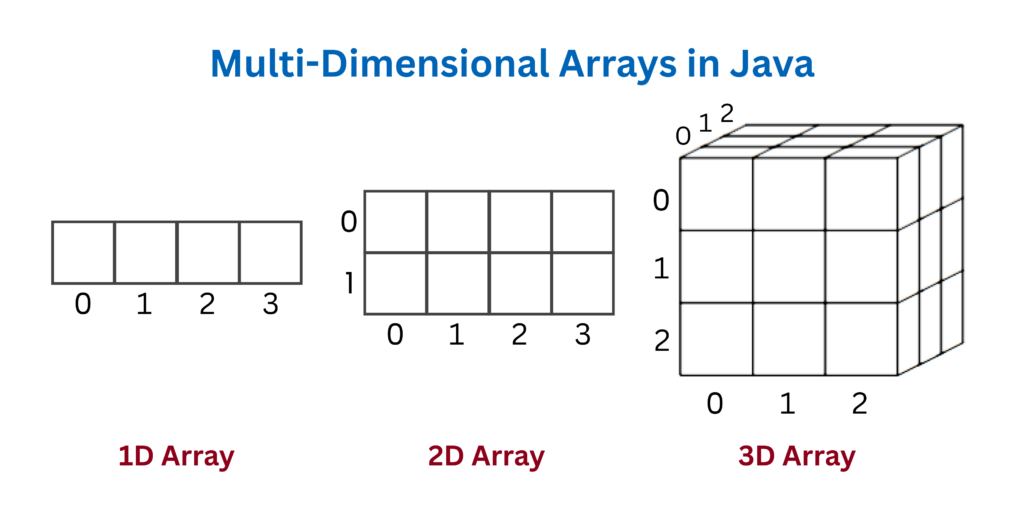
The most commonly used type of multidimensional arrays in Java is the two-dimensional array, as it closely resembles real-world data structures like spreadsheets and matrices.
Declaration of Multidimensional Arrays
When you declare a multidimensional array, you specify the data type and indicate that the variable will hold multiple arrays. The number of brackets used during declaration determines the number of dimensions.
For example:
- Two brackets indicate a two-dimensional array:
int[][] arr;- Three brackets indicate a three-dimensional array
int[][][] arr;Initialization of Multidimensional Arrays
In multidimensional arrays in Java, initialization can be done in multiple ways depending on the requirement.
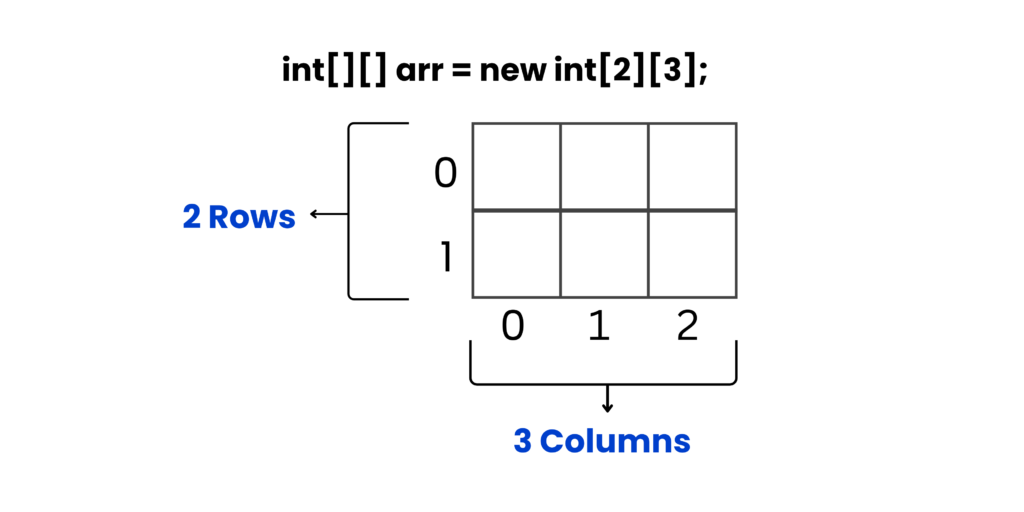
Method 1: Declaration with size
You can initialize the array by specifying the number of rows and columns, which creates a fixed-size structure.
For example:
int[][] arr = new int[2][3];This creates a 2D array with 2 rows and 3 columns.
Method 2: Declaration with Values
You can directly assign values in a structured format, which automatically determines the size of the array.
For example:
int[][] matrix = {
    {1, 2, 3},
    {4, 5, 6},
    {7, 8, 9}
};
In many practical scenarios, multidimensional arrays in Java are initialized with predefined values when the data is known in advance, or dynamically when the size depends on user input.
Accessing Elements in Multidimensional Arrays
Accessing elements in multidimensional arrays in Java requires multiple indices. Each index corresponds to a specific dimension.
For a two-dimensional array:
- The first index represents the row
- The second index represents the column
Syntax:
arrayName[rowIndex][columnIndex]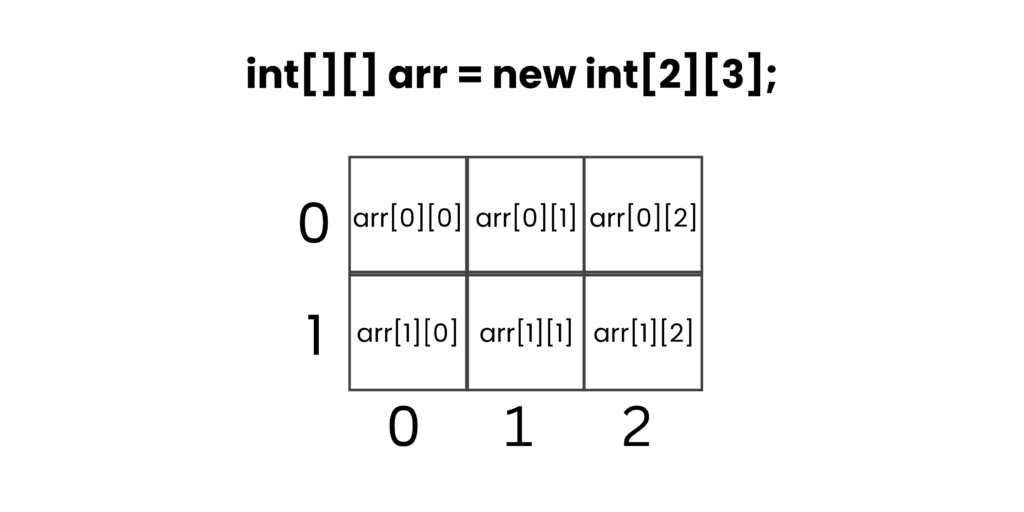
For example:
class Test {
    public static void main(String[] args) {
        int[][] matrix = {
            {10, 20, 30},
            {40, 50, 60}
        };

        System.out.println(matrix[0][1]);
    }
}
Output:
20Explanation:
- The given array looks like this in table form:
- Row 0 -> 10 20 30
- Row 1 -> 40 50 60
- In multidimensional arrays in Java, indexing always starts from 0, not 1.
- The expression matrix[0][1] means:
- 0 -> first row
- 1 -> second column
- So we go to:
- First row -> {10, 20, 30}
- Then second element in that row -> 20
- Therefore, the value accessed is 20, which gets printed as output.
Iterating Through Multidimensional Arrays
Iteration is the process of traversing through all elements of an array. In multidimensional arrays in Java, iteration is typically done using nested loops.
For example:
class Test {
    public static void main(String[] args) {
        int[][] matrix = {
            {1, 2, 3},
            {4, 5, 6}
        };

        for(int i = 0; i < matrix.length; i++) {
            for(int j = 0; j < matrix[i].length; j++) {
                System.out.print(matrix[i][j] + " ");
            }
            System.out.println();
        }
    }
}
Output:
1 2 3
4 5 6
Explanation:
- The given structure is a two-dimensional array, which is a type of multidimensional arrays in Java.
- The array looks like this in table form:
- Row 0 -> 1, 2, 3
- Row 1 -> 4, 5, 6
- The outer loop i is used to go through each row of the array.
- First iteration -> i = 0 (first row)
- Second iteration -> i = 1 (second row)
- The inner loop j is used to go through each column inside the current row.
- First Iteration i = 0: The loop accesses the first row -> {1, 2, 3}
Inner loop runs:- j = 0 -> prints 1
- j = 1 -> prints 2
- j = 2 -> prints 3
- After finishing the row, System.out.println() moves to the next line.
- Second Iteration i = 1: The loop accesses the second row -> {4, 5, 6}
Inner loop runs:- j = 0 -> prints 4
- j = 1 -> prints 5
- j = 2 -> prints 6
- Again, a new line is printed after this row.
Another method for iterating through a multidimensional array is using the enhanced for loop.
Example:
class Test {
    public static void main(String[] args) {
        int[][] matrix = {
            {1, 2, 3},
            {4, 5, 6}
        };

        for(int[] row : matrix) {
            for(int value : row) {
                System.out.print(value + " ");
            }
        System.out.println();
        }
    }
}
Output:
1 2 3
4 5 6
Explanation:
- The outer loop:
- for(int[] row : matrix) takes each row from the matrix one by one.
The inner loop:
for(int value : row) takes each element (value) from the current row.
- First Iteration of Outer Loop (row = {1, 2, 3})
Inner loop runs:- value = 1 -> prints 1
- value = 2 -> prints 2
- value = 3 -> prints 3
- After finishing the row, System.out.println() moves to the next line.
- Second Iteration of Outer Loop (row = {4, 5, 6})
Inner loop runs:- value = 4 -> prints 4
- value = 5 -> prints 5
- value = 6 -> prints 6
- Again, a new line is printed after this row.
Check out the official documentation for Arrays in Java by Oracle.
Types of Multidimensional Arrays in Java
Multidimensional arrays can be categorized into different types based on the number of dimensions they have and how the data is structured within them.
Two-Dimensional Arrays
Two-dimensional arrays are the most basic and widely used form of multidimensional arrays in Java. They store data in rows and columns, similar to a table.
They are commonly used in scenarios like:
- Storing marks of students
- Representing matrices
- Displaying tabular data
Because of their simplicity and practicality, two-dimensional arrays form the foundation for understanding more complex structures.
Three-Dimensional Arrays
Three-dimensional arrays extend the concept further by adding another layer. Instead of just rows and columns, they include depth.
This type of multidimensional arrays in Java is used when data has multiple levels, such as:
- Storing multiple matrices
- Representing 3D objects
- Advanced scientific computations
Although powerful, three-dimensional arrays are less commonly used compared to two-dimensional arrays because they are more complex to manage.
Jagged Arrays in Java
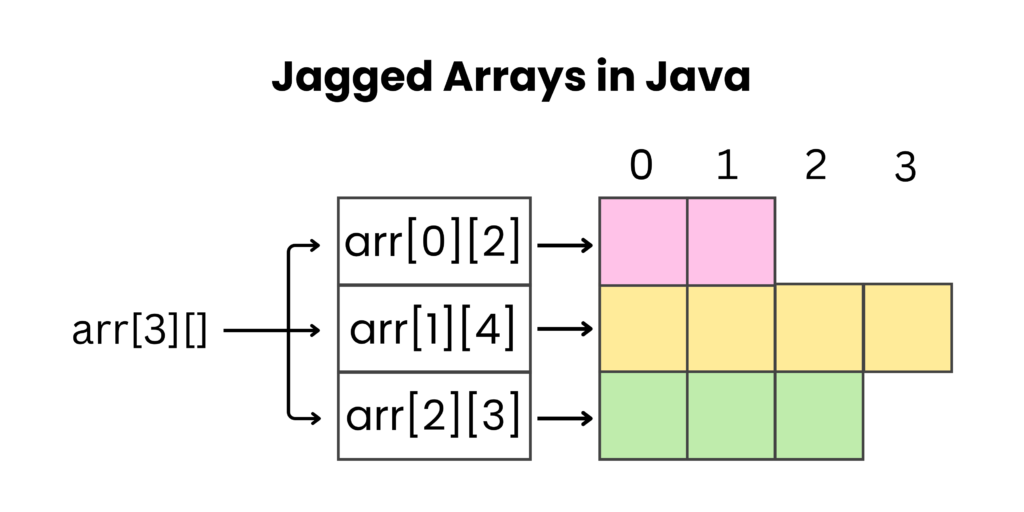
One unique feature of multidimensional arrays in Java is that they do not have to be perfectly rectangular. This means each row can have a different number of columns. Such arrays are known as jagged arrays.
In jagged arrays:
- Each row is treated as a separate array
- The length of each row can vary
This flexibility allows efficient memory usage because you only allocate space where it is needed.
Declaration of a Jagged Array:
int[][] arr = new int[3][];This creates 3 rows, but the columns are not defined,
Initialization of Each Row:
arr[0] = new int[2]; // 2 elements
arr[1] = new int[4]; // 4 elements
arr[2] = new int[3]; // 3 elements
Now each row has a different size.
Example code:
class Test {
    public static void main(String[] args) {

        // Declaration
        int[][] arr = new int[3][];

        // Initialization (different column sizes)
        arr[0] = new int[2];
        arr[1] = new int[4];
        arr[2] = new int[3];

        // Assignment of values
        int x = 1;
        for(int i = 0; i < arr.length; i++) {
            for(int j = 0; j < arr[i].length; j++) {
                arr[i][j] = x;
                x++;
            }
        }

        // Printing the jagged array
        for(int i = 0; i < arr.length; i++) {
            for(int j = 0; j < arr[i].length; j++) {
                System.out.print(arr[i][j] + " ");
            }
            System.out.println();
        }
    }
}
Output:
1 2
3 4 5 6
7 8 9
Explanation:
- A jagged array is declared with 3 rows -> int[][] arr = new int[3][]
- Each row is given a different size:
- Row 0 -> 2 elements
- Row 1 -> 4 elements
- Row 2 -> 3 elements
- Start with x = 1
- First Row (i = 0 -> size = 2)
- j = 0 -> arr[0][0] = 1 -> x becomes 2
- j = 1 -> arr[0][1] = 2 -> x becomes 3
- Second Row (i = 1 -> size = 4)
- j = 0 -> arr[1][0] = 3 -> x becomes 4
- j = 1 -> arr[1][1] = 4 -> x becomes 5
- j = 2 -> arr[1][2] = 5 -> x becomes 6
- j = 3 -> arr[1][3] = 6 -> x becomes 7
- Third Row (i = 2 -> size = 3)
- j = 0 -> arr[2][0] = 7 -> x becomes 8
- j = 1 -> arr[2][1] = 8 -> x becomes 9
- j = 2 -> arr[2][2] = 9 -> x becomes 10
Check out this video to understand jagged arrays in a structured way:
Memory Representation in Java
In Java, multidimensional arrays are not stored as one continuous block of memory. Instead, they are implemented as arrays of arrays, which is especially important in the case of jagged arrays. In a jagged array, the main array does not directly store all the values; rather, it holds references (addresses) to other arrays. Each of these arrays represents a row, and every row is created separately in memory. This means the rows can have different sizes and can exist at different memory locations.
When a jagged array is first declared, memory is allocated only for the references, not for the actual data. The individual rows are then initialized separately, each with its own size, creating independent array objects. Because of this structure, each row works independently, and its length can vary. This approach also improves memory efficiency, as space is allocated only where needed instead of forcing a fixed rectangular structure.
This way of organizing memory is a key characteristic of multidimensional arrays in Java, making them flexible and suitable for handling uneven or irregular data. Although the memory is not continuous, this approach allows developers to design dynamic structures without wasting space, which is one of the main advantages of jagged arrays.
Advantages of Multidimensional Arrays
Multidimensional arrays in Java provide a powerful way to store and manage data in a structured and organized format, especially when dealing with complex or large datasets.
- Represents complex data easily: Multidimensional arrays in Java allow you to store related data in rows and columns instead of using multiple separate arrays. This makes handling structured data like tables or records much simpler.
- Useful for mathematical operations: Multidimensional arrays in Java are widely used in matrix calculations and scientific computations. They provide a natural way to perform operations like addition and multiplication on structured numeric data.
- Improves code readability: Using multidimensional arrays in Java keeps code organized by grouping related data in one structure. This makes programs easier to understand and maintain.
- Supports flexible row sizes: Multidimensional arrays in Java allow jagged arrays, where each row can have a different size. This helps in storing uneven data efficiently without wasting memory.
Wrapping Up
Multidimensional arrays are an important concept that help in organizing data in a structured and meaningful way. Instead of storing information in a single line, they allow you to arrange it in rows, columns, or even higher dimensions. This makes it much easier to work with data that naturally fits into a table-like format, such as marks, matrices, or grids. In Java, they are implemented as arrays of arrays, which gives them flexibility and ease of use.
As you practice using multidimensional arrays, you will notice how they simplify complex problems. Whether you are performing matrix operations, building games, or handling structured datasets, they provide a clear and efficient approach. The use of loops, especially nested loops, becomes essential when working with them, as it allows you to access and process every element systematically.
Overall, multidimensional arrays are a powerful tool in Java programming. With consistent practice, they become easier to understand and apply in different scenarios. Mastering this concept will strengthen your problem-solving skills and prepare you for more advanced topics where structured data handling is required.