Java Tutorial #2: Understanding Java Syntax, Classes, Main Method, and Program Structure
April 18, 2026
After setting up the development environment and writing our first program in the previous tutorial, the next step is to understand a few more basic concepts of Java programming, including Java syntax. Every programming language has its own syntax and rules that determine how programs should be written. Java is known for having a clear and structured syntax, which helps developers build reliable and scalable applications.
In this tutorial, you will learn the basic structure of a Java program, including how classes work, what the main method does, and how Java source code is organized and interpreted internally. Understanding these fundamental concepts will help you read and write Java programs confidently.
By the end of this tutorial, you will understand the way Java programs are structured and how the Java compiler interprets your code.
Table of Contents
What is Java Syntax?
Java syntax refers to the rules that define how Java programs are written and interpreted by the compiler. These rules determine how keywords, classes, methods, and statements should be written.
Just like grammar rules in a natural language, syntax rules ensure that the code is written correctly so that the computer can understand it.
Java syntax is designed to be simple, readable, and structured. Some important characteristics include:
- Every program is written inside a class
- Code statements end with a semicolon
- Curly braces { } are used to define blocks of code
- Java is case-sensitive, which means it treats uppercase and lowercase letters differently
For example, the following code is a valid Java program:
public class Hello{
    public static void main(String[] args){
        System.out.println("Hello World");
    }
}
The structure contains:
- A class declaration ‘Hello‘
- Main method ‘public static void main(String[] args)‘
- Statements inside the method ‘System.out.println(“Hello World”);’
Understanding Classes in Java
A class in Java is a blueprint used to create objects. It defines the data (Attributes) and behaviors (Methods) that the objects created from it will have. In other words, a class describes what data an object will store and what actions it can perform.
Suppose a house is to be built by an architect, then:
- Class: The blueprint/design of the house
- Object: Actual house built using that blueprint (Your house, Your friend’s house, etc.)
- Attributes/Variables: Characteristics of the house (color, numberOfRooms, area, etc.)
- Methods: Functionalities of the house (openDoor(), turnOnLights(), lockHouse(), etc.)
Example:
class Hello{

    // Your code here

}
Here, the class name is ‘Hello’.
Key Points:
- A Java file can contain multiple classes
- Only one class can be public
- The public class name must match the file name
In the upcoming tutorials of this series, we will learn in detail about classes and objects.
Understanding the Main Method
The main method is the entry point of a Java program. when you run a Java program, the JVM looks specifically for this method to start execution.
public static void main(String[] args){

    //Your code here

}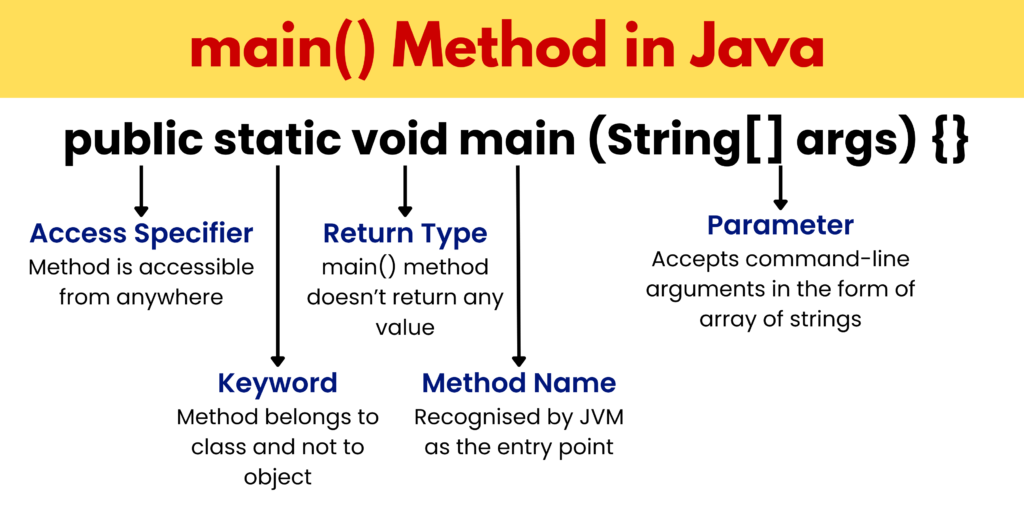
Breaking Down the Main Method
- public: An access modifier that allows the method to be accessed from anywhere, allowing JVM to call it from outside the class.
- static: The method belongs to the class and not to objects, allowing JVM to call the main method directly without creating an object.
- void: The method does not return any value after execution.
- main: Name of the method where program execution begins, and it is recognized by the JVM as the entry point.
- String[] args: Parameter that allows program to receive command-line arguments as input in the form of an array of strings.
To understand the main() method in Java in more detail, refer to the main() method in Java documentation by Oracle.
Statements in Java
In Java syntax, a statement is a single instruction written to perform a specific task, and it usually ends with a semicolon.
int x = 10;
System.out.println(x);
Code Blocks and Curly Braces
In Java Syntax, code blocks are defined using curly braces {}, which group multiple statements together. they are generally used in classes, methods, loops and conditions.
{
  // block of code
}
Case Sensitivity in Java
In Java syntax, the language is case-sensitive, meaning it treats uppercase and lowercase letters differently in identifiers and keywords
.
Example:
‘System’ is not the same as ‘system’.
Therefore, System.out.println() is correct, while system.out.println() results in an error.
Java Identifiers
Identifiers are names of variables, classes, and methods in Java syntax.
Rules:
- Must start with a letter, an underscore, or $
- Cannot start with a number
- Cannot use keywords (pre-defined words in Java)
Example:
Valid identifiers: totalMarks, _studentName_
Invalid identifiers: 1value, class
Comments in Java
A comment is a non-executable java syntax used to improve readability and understanding, which are ignored by the compiler during program execution.
public class Hello{
    public static void main(String[] args){
        System.out.println("Hello World");   //This syntax prints 'Hello World'
    }
}
Types of comments
- Single-line comment:
// This is a single-line comment- Multi-line comment:
/* This is a multi-line comment
And multiple line comments can be added at once */- Documentation comment:
/** This is a ducumentation comment */Output in Java
To display output in Java, we commonly use the System.out.println() method.
There are common two methods to print outputs in java:
Method 1:
System.out.println("Hello");
System.out.println("World");
This method prints text on the console and automatically moves the cursor to the next line.
Output:
Hello
World
Method 2:
System.out.print("Hello");
System.out.print("World");
This method prints the text without moving the cursor to the next line.
Output:
HelloWorldJava Execution Flow (Behind the Scenes)
The following steps are followed to execute a Java program:
STEP 1: Compilation -> The compiler converts code into bytecode using the following command and produces a .class file.
javac Example.javaSTEP 2: Class Loading -> JVM loads the .class file into memory.
STEP 3: Main Method Execution -> To execute, we use the command
java ExampleJVM searches for the main method and execution process starts.
public static void main(String[] args)Practice Questions
1. Identify the error:
public class Test{
    public static void main(String[] args){
        System.out.println("Hello World");
    }
}2. What will be the output?
public class Demo{
    public static void main(String[] args){
        System.out.print("Java");
        System.out.println("Programming");
    }
}JavaProgramming
The print() method displays the text without moving to a new line, while println() prints the text and then moves to the next line. As a result, both outputs appear on he same line.
3. Fix the code:
public class Sample{
    public static void main(String[] args){
        System.out.println("Hello")
    }
}