Java Tutorial #5: Operators in Java
April 19, 2026
Table of Contents
What are Operators in Java?
Operators in Java are special symbols or keywords that perform operations on one, two, or three operands to produce a result. They help you do tasks like calculations. comparisons, and decision-making in a program.
For example:
int x = 10 + 5;Here,
- ‘+’ is the operator
- 10 and 5 are the operands
What are Operands?
Operands are the values or variables on which an operator works. In simple terms, they are inputs given to an operator to perform a task. In Java, the number of operands is defined for each operator individually, not for the entire expression. So, even in longer expressions, every operator works only on its fixed number of operands.
How many operands can an operator have?
An operator in Java works on a fixed number of operands:
- Unary operator -> Works on one operand
- Binary operator -> Works on two operands
- Ternary operator -> Works on three operands
No operator in Java works on more than three operands.
Common Confusion: Multiple values in one Expression
You might see expressions like this:
int result = a + b + c + d;In first glance, it might look like the ‘+’ operator is working on four operands at once, but that is not true.
Java evaluates this step by step:
((a + b) + c) + dSo:
- First, a + b is calculated
- Then the result is added to c
- Then the result is added to d
Each ‘+’ operator is working only on two operands at a time. Hence the ‘+’ operator is a binary operator.
Types of Operators in Java
There are 8 types of operators in Java:
- Arithmetic Operators
- Unary Operators
- Relational Operators
- Logical Operators
- Bitwise Operators
- Assignment Operators
- Ternary Operators
- instanceof Operators
1. Arithmetic Operators
Arithmetic Operators are used to perform basic mathematical operations like addition, subtraction, multiplication, division, and finding the remainder. They work with numeric values.
| Operator | Description |
|---|---|
| + | Addition |
| - | Subtraction |
| * | Multiplication |
| / | Division |
| % | Modulus (Remainder) |
Example:
class Test {
    public static void main(String[] args) {
        int a = 10, b = 3;
        System.out.println(a + b);    // Output: 13
        System.out.println(a - b);    // Output: 7
        System.out.println(a * b);    // Output: 30
        System.out.println(a / b);    // Output: 3
        System.out.println(a % b);    // Output: 1
    }
}
Difference between ‘/’ and ‘%’ :
The division operator is used to divide one number by another. It returns the quotient of the division.
In Java, the result of division depends on the data types of the operands. If both operand are integers, the result will also be an integer, implying that the decimal part will get removed (not rounded).
In the above result, you observed that dividing 10 by 3 gives 3, and not 3.33 since we are dealing with integers. To include decimals in the result, at least one operand should be a double or a float.
integer / integer -> integer result (integer division)

integer / double -> double result (floating-point division)
The modulus operator is used to find the remainder after division. Instead of giving the quotient, it gives what is left after dividing one number by another.
In the above result, you observed that using the modulus operator on 10 and 3 gives the remainder of the performed division, that is 1.
The result of modulus operator depends on the sign of the dividend (the first number).
-10 % 3 gives a negative result
10 % -3 gives a positive result
NOTE:
Dividing an integer by zero causes a runtime error, whereas dividing a floating-point number with zero gives a special value like infinity.
10 / 0 // Output: Runtime Error
10.0 / 0 // Output: Infinity
-10.0 / 0 // Output: -Infinity
0.0 / 0 // Output: NaN (Not a Number)
2. Unary Operator
Unary operators are operators that work on only one operand. They are used to increase or decrease a value, change its sign, or reverse a boolean value.
| Operator | Description |
|---|---|
| ++ | Increment |
| -- | Decrement |
| + | Unary Plus |
| - | Unary Minus |
a) Increment Operator (++):
The increment operator is used to increase the value of a variable by 1. There are two ways to use an increment operator:
i) Pre-increment (++x) -> The value is first increased and after that it is used in the expression.
class Test {
    public static void main(String[] args) {
        int x = 5;
        int y = ++x;
        System.out.println(x);
        System.out.println(y);
    }
}
Output:
6
6
Explanation:
- When ++x is performed, first the ++ operator increments the value of x from 5 to 6.
- After that variable y reads and stores the value of x, which is now 6.
- Hence, both the values of x and y are printed as 6.
ii) Post-increment (x++) -> The value is first used in the expression and then increased.
class Test {
    public static void main(String[] args) {
        int x = 5;
        int y = x++;
        System.out.println(x);
        System.out.println(y);
    }
}
Output:
6
5
Explanation:
- First, the variable y reads and stores the value of x in it, which is initially 5.
- After that, the ++ operator increments the value of x to 6.
- Hence, the value of x is printed as 6, and the value of y is printed as 5.
b) Decrement Operator (- -):
The decrement operator is used to decrease the value of a variable by 1. There are two ways to use a decrement operator:
i) Pre-decrement (- -x) -> The value is first decreased and after that it is used in the expression.
class Test {
    public static void main(String[] args) {
        int x = 5;
        int y = --x;
        System.out.println(x);
        System.out.println(y);
    }
}
Output:
4
4
Explanation:
- When – –x is performed, first the – – operator decrements the value of x from 5 to 4.
- After that variable y reads and stores the value of x, which is now 4.
- Hence, both the values of x and y are printed as 4.
ii) Post-decrement (x- -) -> The value is first used in the expression and then increased.
class Test {
    public static void main(String[] args) {
        int x = 5;
        int y = x--;
        System.out.println(x);
        System.out.println(y);
    }
}
Output:
4
5
Explanation:
- First, the variable y reads and stores the value of x in it, which is initially 5.
- After that, the – – operator decrements the value of x to 4.
- Hence, the value of x is printed as 4, and the value of y is printed as 5.
c) Unary Minus (-):
The unary minus operator is used to change the sign of number. It converts positive number to negative and vice versa.
class Test {
    public static void main(String[] args) {
        int x = 5;
        int y = -x;
        System.out.println(y);
    }
}
Output:
-5d) Unary Plus (+):
The unary minus operator is used to represent a positive number. It does not change the value but is used for clarity or expression consistency.
class Test {
    public static void main(String[] args) {
        int x = 5;
        int y = +x;
        System.out.println(y);
    }
}
Output:
53. Relational Operator
Relational operators are used to compare two values. They check conditions like equals, greater than, or less than, and always returns a boolean value (true or false).
| Operator | Description |
|---|---|
| == | Equal to |
| != | Not equal to |
| > | Greater than |
| < | Less than |
| >= | Greater than or equal to |
| <= | Less than or equal to |
a) Equal to (==):
The equal to operator checks whether two values are equal.
class Test {
    public static void main(String[] args) {
        int a = 10, b = 10;
        System.out.println(a == b);
    }
}
Output:
trueb) Not equal to (!=):
The not equal to operator checks whether two values are different.
class Test {
    public static void main(String[] args) {
        int a = 10, b = 20;
        System.out.println(a != b);
    }
}
Output:
truec) Greater than (>):
This operator checks if the left value is greater than the right value.
class Test {
    public static void main(String[] args) {
        int a = 10, b = 5;
        System.out.println(a > b);
    }
}
Output:
trued) Less than (<):
This operator checks if the left value is smaller than the right value.
class Test {
    public static void main(String[] args) {
        int a = 10, b = 20;
        System.out.println(a < b);
    }
}
Output:
truee) Greater than equal to (>=):
This operator checks if the left value is greater than or equal to the right value.
class Test {
    public static void main(String[] args) {
        int a = 10, b = 20;
        System.out.println(a >= b);
    }
}
Output:
falsef) Less than equal to (<=):
This operator checks if the left value is less than or equal to the right value.
class Test {
    public static void main(String[] args) {
        int a = 10, b = 20;
        System.out.println(a <= b);
    }
}
Output:
trueDifference between ‘==’ and ‘=’:
The ‘==’ operator is used for comparison between two compatible data types. On the other hand, the ‘=’ operator is used for assigning values.class Test {
public static void main(String[] args) {
int x = 5; // assignment
System.out.println(x == 5); // comparison
}
}Common Mistake:
int result = (5 > 3);
System.out.println(result); // Error
Relational operators return a boolean value, thus our declared variable should also be of type boolean.
Corrected code:
boolean result = (5 > 3);
System.out.println(result); // Output: true
4. Logical Operators
Logical operators are used to combine multiple conditions. They help in making decisions based on more than one condition and returns a boolean value.
| Operator | Description |
|---|---|
| && | Logical AND |
| || | Logical OR |
| ! | Logical NOT |
a) Logical AND (&&):
The logical AND operator returns true only if both conditions are true. If any one condition is false, the result becomes false.
class Test {
    public static void main(String[] args) {
        int x = 10;

        System.out.println(x > 5 && x < 20);
        System.out.println(x > 5 && x < 5);
    }
}
Output:
true
false
Explanation:
- true && true -> true
- true && false -> false
- false && true/false -> false
NOTE:
When using the logical AND operator, if the first condition is false, the second condition is not checked.
b) Logical OR (||):
The logical OR operator returns true only if at least one condition is true. It returns false only when both conditions are false.
class Test {
    public static void main(String[] args) {
        int x = 10;

        System.out.println(x > 5 || x < 5);
        System.out.println(x < 5 || x == 5);
    }
}
Output:
true
false
Explanation:
- true || true -> true
- true || false -> true
- false || false -> false
NOTE:
When using the logical OR operator, if the first condition is true, the second condition is not checked.
c) Logical NOT (!):
The logical NOT operator is used to reverse a boolean value. This operator is also an unary operator since it works on only one operand.
class Test {
    public static void main(String[] args) {
        boolean flag = true;
        System.out.println(!flag);
    }
}
Output:
falseExplanation:
- !true -> false
- !false -> true
5. Bitwise Operator
Bitwise operator work on the binary for (bits) of numbers. They perform operations on individual bits instead of the whole number.
Before using bitwise operators, it’s important to understand that all numbers in Java are stored in binary form.
For example:
- 5 -> 0101
- 3 -> 0011
Bitwise operators compare these bits position by position. We will learn in detail about the concept of signed and unsigned in upcoming tutorials.
| Operator | Description |
|---|---|
| & | Bitwise AND |
| | | Bitwise OR |
| ^ | Bitwise XOR |
| ~ | Bitwise NOT |
| << | Left shift |
| >> | Right shift |
| >>> | Unsigned right shift |
a) Bitwise AND (&):
The bitwise AND operator compares each bit of two numbers. It returns 1 only if both bits are 1, otherwise 0.
class Test {
    public static void main(String[] args) {
        int a = 5;
        int b = 3;
        System.out.println(a & b);
    }
}
Output:
1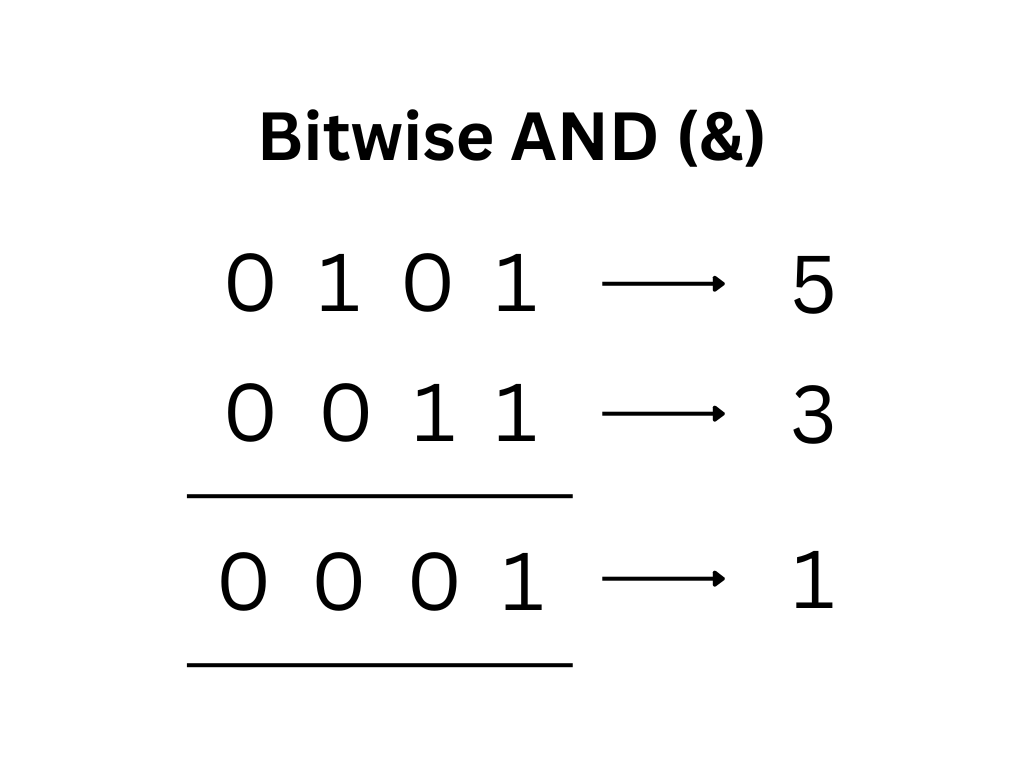
b) Bitwise OR (|):
The bitwise OR operator returns 1 if at least one bit is 1. It returns 0 only if both bits are 0.
class Test {
    public static void main(String[] args) {
        int a = 5;
        int b = 3;
        System.out.println(a | b);
    }
}
Output:
7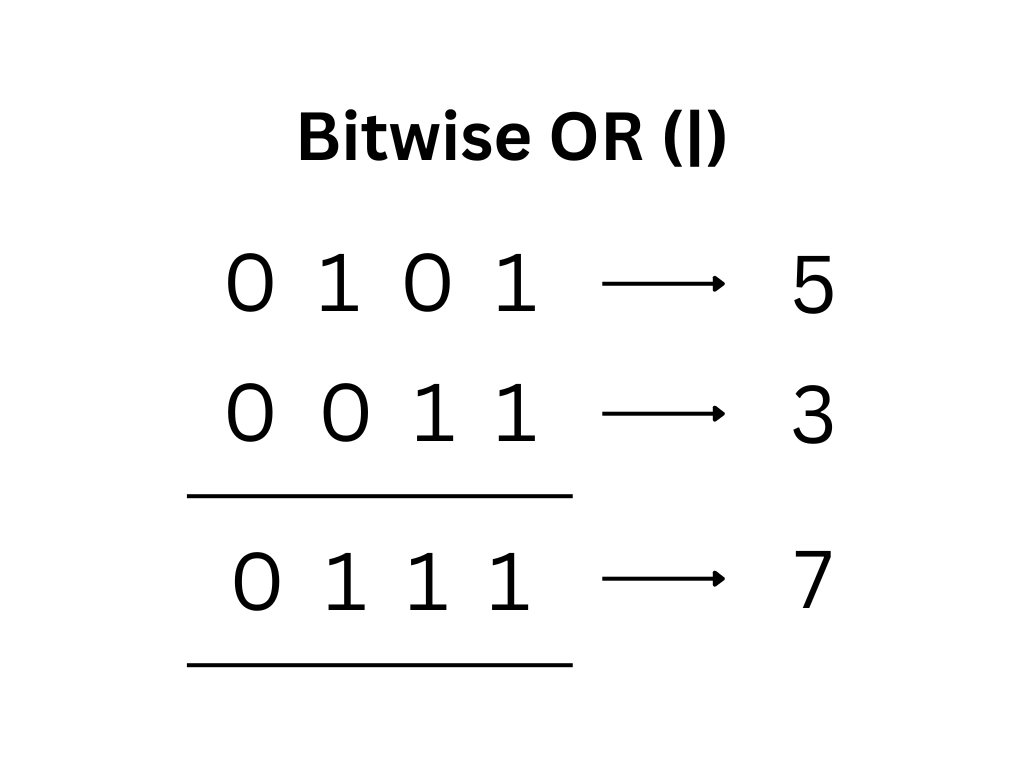
c) Bitwise XOR (^):
The bitwise XOR operator returns 1 if both bits are different, and 0 if they are the same.
class Test {
    public static void main(String[] args) {
        int a = 5;
        int b = 3;
        System.out.println(a ^ b);
    }
}
Output:
6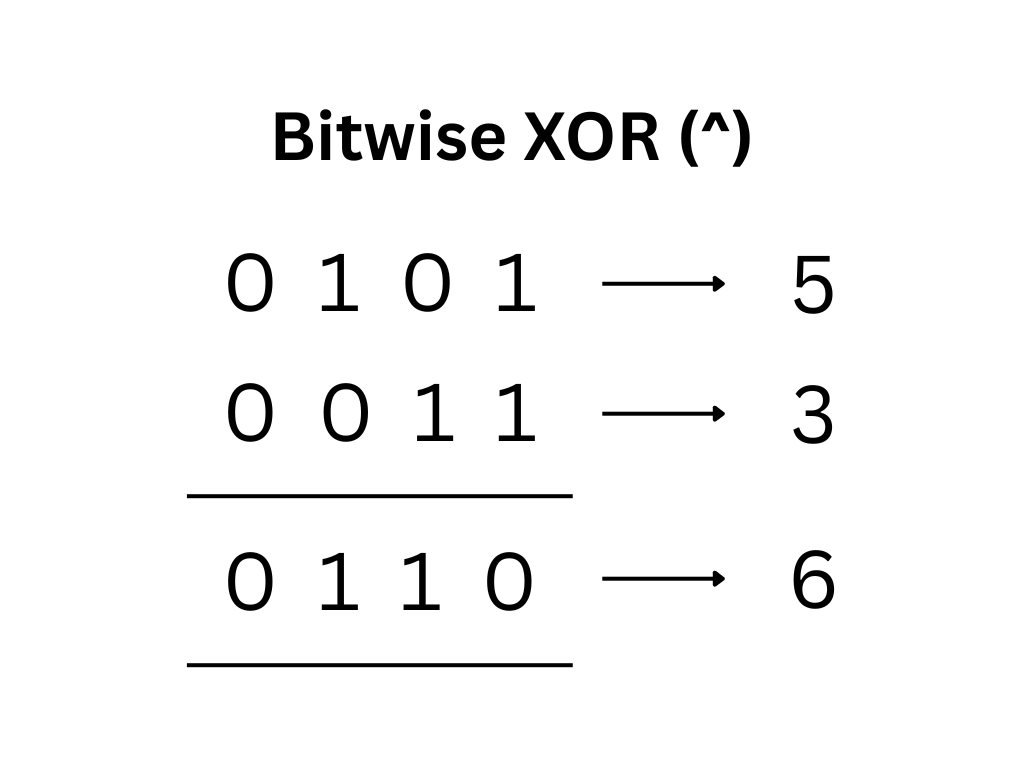
d) Bitwise NOT (~):
The bitwise NOT operator flips all bits, i.e., 0 becomes 1, and 1 becomes 0.
class Test {
    public static void main(String[] args) {
        int a = 5;
        System.out.println(~a);
    }
}
Output:
-6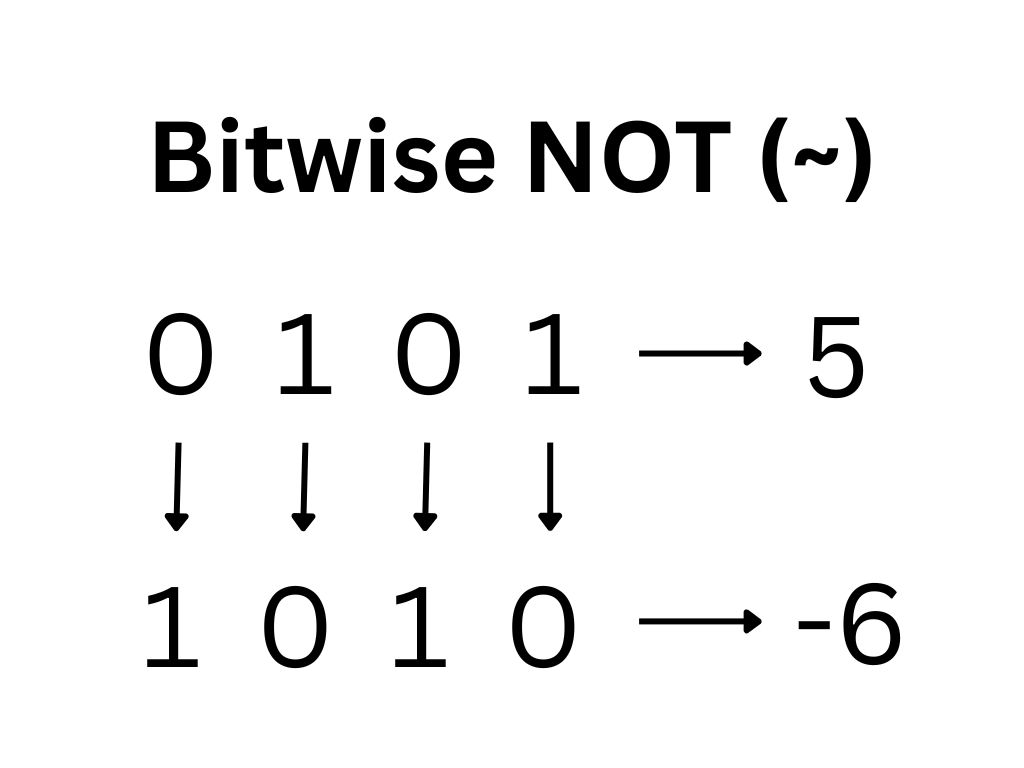
e) Left Shift (<<):
The left shift operator shifts bits to the left and fills with 0.
class Test {
    public static void main(String[] args) {
        int a = 5;
        System.out.println(a << 1);
    }
}
Output:
10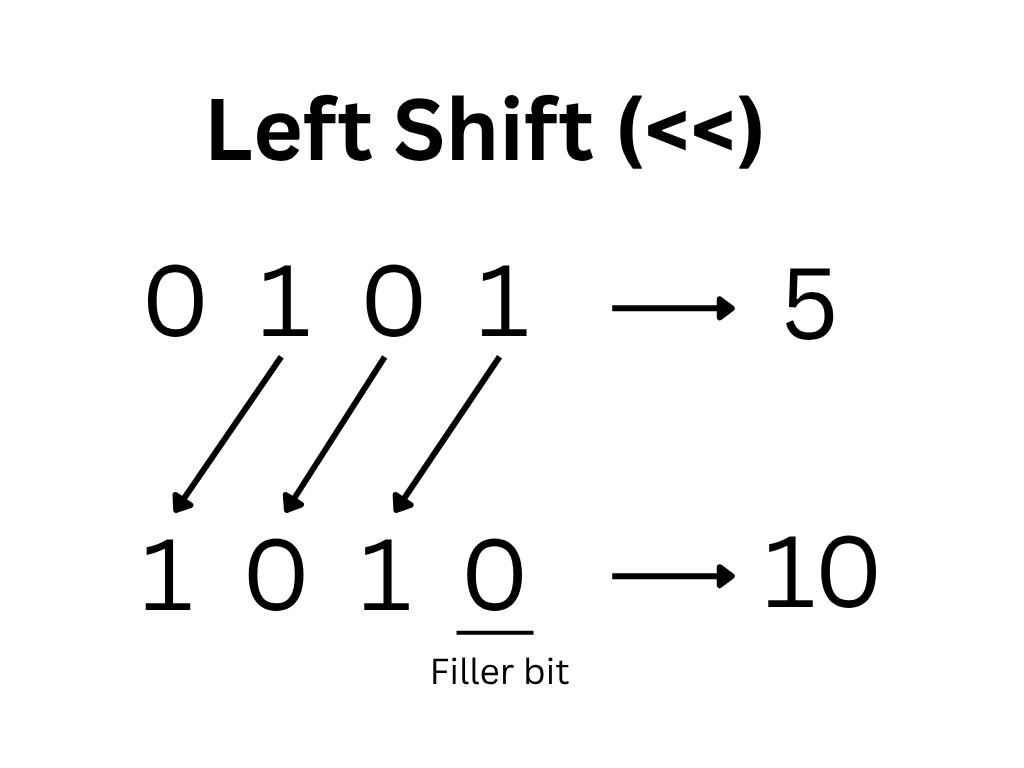
f) Right Shift (>>):
The right shift operator shifts bits to the right.
class Test {
    public static void main(String[] args) {
        int a = 5;
        System.out.println(a >> 1);
    }
}
Output:
2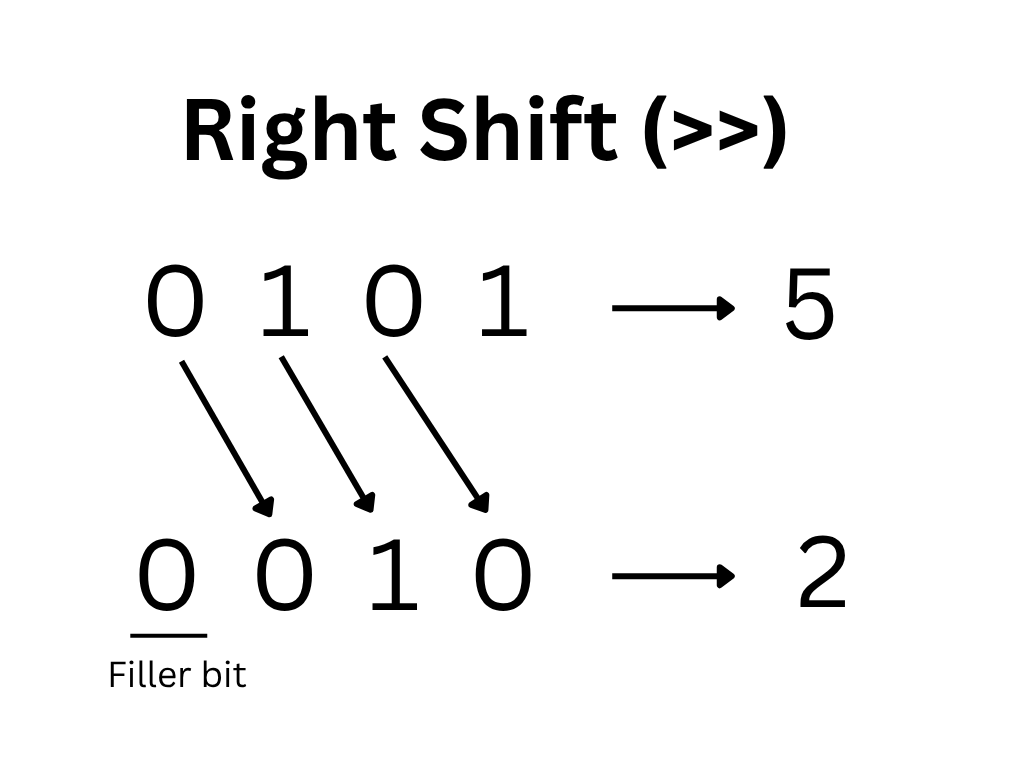
g) Unsigned Right Shift (>>):
The unsigned right shift operator shifts bits to the right and fills with 0, ignoring the sign. It is mostly used to deal with negative numbers.
class Test {
    public static void main(String[] args) {
        int a = -8;
        System.out.println(a >>> 1);
    }
}
Output:
2147483644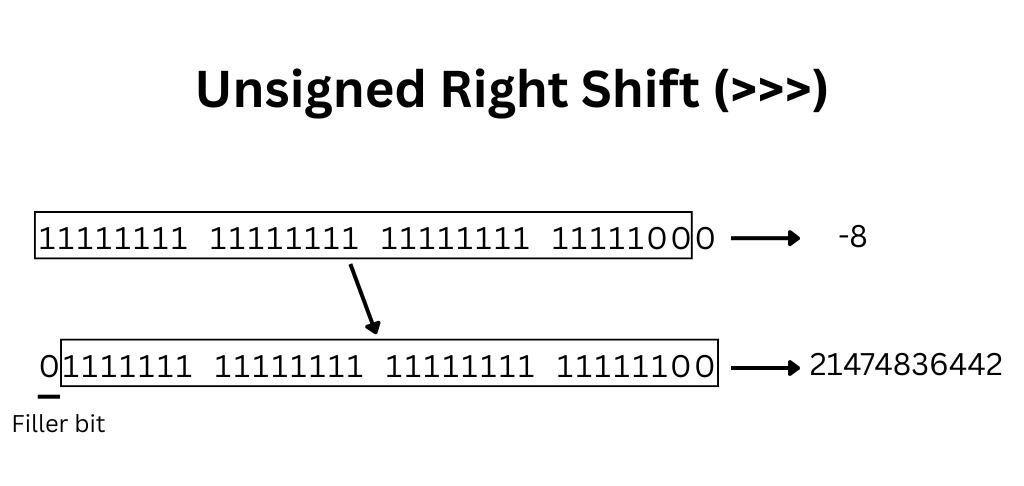
We will learn in detail about the concept of signed and unsigned in upcoming tutorials.
6. Assignment Operator
Assignment operators are used to assign values to variables. They take the values on the right-hand side and store it in the variable on the left-hand side.
| Operator | Description |
|---|---|
| = | Basic assignment |
| += | Addition assignment |
| -= | Subtraction assignment |
| *= | Multiplication assignment |
| /= | Division assignment |
| %= | Modulus assignment |
a) Basic Assignment Operator (=):
The basic assignment operator assigns a value to a variable.
int a = 10;b) Addition Assignment Operator (+=):
The addition assignment operator adds a value to the variable and assigns the result back to the same variable.
class Test {
    public static void main(String[] args) {
        int x = 10;
        x += 3;                 // x = x + 3;
        System.out.println(x);
    }
}
Output:
13c) Subtraction Assignment Operator (-=):
The subtraction assignment operator subtracts a value to the variable and assigns the result back to the same variable.
class Test {
    public static void main(String[] args) {
        int x = 10;
        x -= 3;                 // x = x - 3;
        System.out.println(x);
    }
}
Output:
7d) Multiplication Assignment Operator (*=):
The multiplication assignment operator multiplies the variable by a value and assigns the result back to the same variable.
class Test {
    public static void main(String[] args) {
        int x = 10;
        x *= 3;                 // x = x * 3;
        System.out.println(x);
    }
}
Output:
30e) Division Assignment Operator (/=):
The division assignment operator divides the variable by a value and assigns the result back to the same variable.
class Test {
    public static void main(String[] args) {
        int x = 9;
        x /= 3;                 // x = x / 3;
        System.out.println(x);
    }
}
Output:
3f) Modulus Assignment Operator (%=):
The modulus assignment operator finds the remainder after dividing the variable by a value and assigns the result back to the same variable.
class Test {
    public static void main(String[] args) {
        int x = 10;
        x %= 3;                 // x = x % 3;
        System.out.println(x);
    }
}
Output:
1g) Bitwise and Shift Assignment Operators:
These operators combine bitwise or shift operations with assignment and are mainly used in advanced scenarios like bit manipulation.
- Bitwise assignment -> &=, |=, ^=
- Shift assignment -> <<=, >>=, >>>=
7. Ternary Operator
The ternary operator is a short way to write a simple if-else condition. It checks a condition and returns one of two values based on the result.
Syntax:
condition ? expression1 : expression2;How it works:
- First, the condition is evaluated
- If the condition is true, expression1 is executed
- if the condition is false, expression2 is executed
Example:
class Test {
    public static void main(String[] args) {
        int a = 10, b = 20;
        int max = (a > b) ? a : b;
        System.out.println(max);
    }
}
Output:
20Explanation:
- Here, the condition a > b is false
- So the value of b is assigned to max
In the upcoming tutorials, we will learn about conditional statements in detail.
8. instanceof Operator
The instanceof operator is used to check whether an object belongs to a particular class or type. It returns a boolean value, either true or false. It only works for objects, not primitive data types.
Syntax:
object instanceof ClassName;Example:
class Test {
    public static void main(String[] args) {
        String str = "Hello";
        System.out.println(str instanceof String);
    }
}
Output:
trueExplanation:
- str is an object of String
- So the result is true
In the upcoming tutorials, we will learn about classes and their objects in detail.
Expression Evaluation in Java
Expression evaluation in Java refers to the process of calculating the result of an expression by executing operations step by step.
When an expression has multiple operators, Java does not evaluate it randomly. Instead, it follows a defined order based on operator precedence and associativity.
Example 1:
int result = 10 + 5 * 2;
Step-by-step evaluation:
- Multiplication (*) has higher priority than addition (+)
- so, 5 * 2 = 10
- Then, 10 + 10 = 20
Final output: 20
Example 2:
int result = 20 - 10 / 2 + 3;
Step-by-step evaluation:
- First division is performed -> 10 / 2 = 5
- Expression becomes -> 20 – 5 + 3
- Left to right evaluation -> 20 – 5 = 15
- Finally -> 15 + 3 = 18
Final output: 18
NOTE:
In Java, expressions are evaluated from left to right, but operator precedence can change the order in which operations are performed.
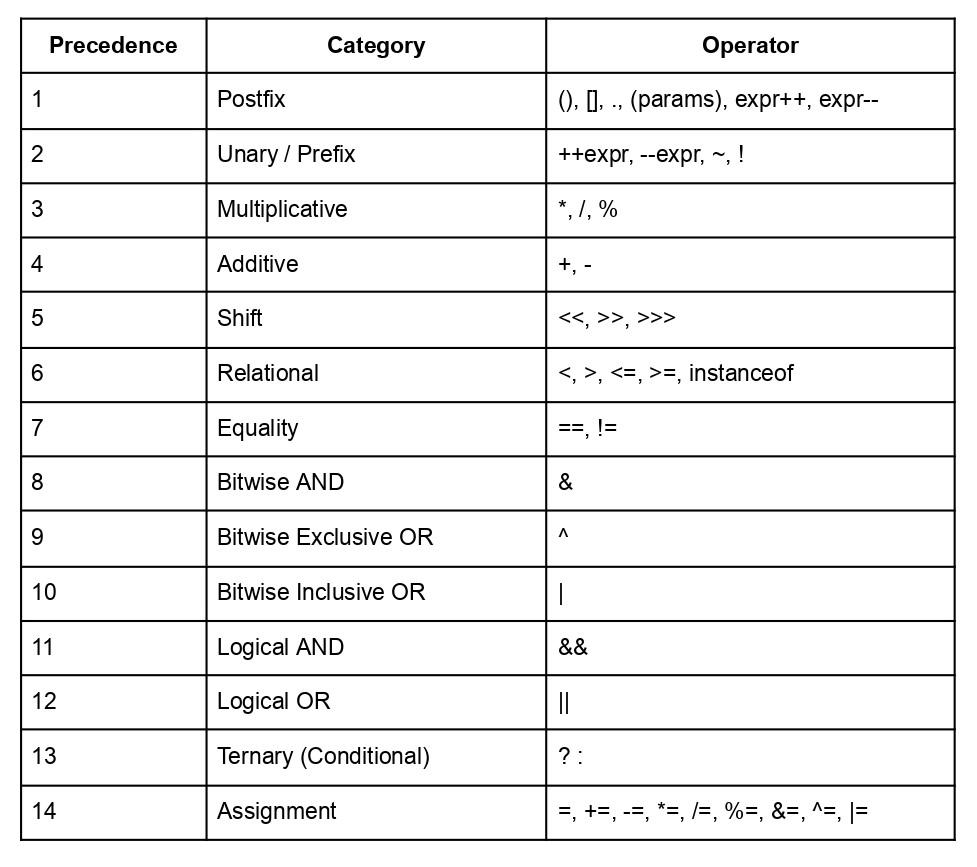
Operator Precedence
Operator precedence defines the priority of operators in an expression. It determines which operator is executed first when multiple operators are present.
Operators with higher precedence are evaluated before operators with lower precedence.
Associativity for Operators in Java
Operator associativity defines the direction in which operators are evaluated when multiple operators of the same precedence level appear in an expression.
Types of Associativity in Java
There are two types of associativity: left-to-right associativity and right-to-left associativity.
Left-to-Right Associativity:
Most operators in Java follow left-to-right associativity, meaning the expression is evaluated from left to right. Common operators include arithmetic, relational, equality ( ==, != ), and logical operators.
Example:
int result = 5 + 2 - 3; // Output: 4
Step-by-step:
- First, 5 + 2 is evaluated, i.e., 7
- Then, 7 – 3 is evaluated, i.e., 4
Right-to-Left Associativity:
Some operators like assignment and ternary operator are evaluated from right-to-left.
Example:
int a, b, c;
a = b = c = 10;
Step-by-step:
- First, 10 is assigned to c
- Then, 10 is assigned to b
- Finally, 10 is assigned to a
To learn more about operators in java, you can refer to Oracle’s official Operators Documentation.
Wrapping Up
In this guide, we explored operators in Java from the ground up, starting with what operators are and how they work with operands. We also cleared common confusion around expressions with multiple values and understood that each operator works on a fixed number of operands. As we moved forward, we covered the different types of operators in Java, including arithmetic, relational, logical, bitwise, assignment, and ternary operators, along with their behavior and practical usage.
Understanding operators in Java is essential because they form the backbone of almost every program you write. Whether you are performing calculations, making decisions, or working with conditions, operators in Java are used everywhere. Concepts like type promotion, expression evaluation, and operator precedence further help in writing correct and efficient code, while avoiding common mistakes ensures better program reliability.
To master operators in Java, focus on practicing different types of expressions and understanding how each operator behaves in real scenarios. The more you work with operators in Java, the more natural they will become, helping you write cleaner, more efficient, and more readable code.