Java Tutorial #6: Conditional Statements in Java: if-else, switch & yield
April 7, 2026
Table of Contents
What are Conditional Statements in Java?
Conditional statements in Java are used to control the flow of execution based on whether a condition evaluates to true or false. In simpler words, conditional statements control how a program behaves in different situations.
A condition is an expression that returns either true, or false. If the condition is true, the corresponding block of code executes. If it is false, that block is skipped and the next condition (if present) is checked.
These statements help in:
- Decision making
- Controlling program flow
- Creating logical problems.
Types of conditional statements in Java
There are several types of conditional statements in Java, each designed for specific scenarios:
- if statement
- if-else statement
- ternary (conditional) operator
- else-if ladder
- nested if
- switch statement
Each of these plays a crucial role in implementing decision-making logic effectively.
1. if Statement
The if statement is the most basic conditional statement in Java. It is used to check a condition and execute a block of code only if that condition is true.
Syntax:
if (condition) {

    // Code to execute if condition is true

}
Example:
class Test {
    public static void main(String[] args) {
        int x = 10;

        if (x > 5){
            System.out.println("x is greater than 5");
        }
    }
}
Output:
x is greater than 5Explanation:
- Here, the condition is x > 5.
- The value of x is 10.
- Since 10 is greater than 5, the condition evaluates to true.
- Therefore, the corresponding block of code inside the if statement is executed.
- if the condition were false, the block would be skipped.
Where to use:
- You want to check a single condition.
- You are performing simple checks like validation or comparison.
Common use cases:
- Checking if a number is positive
- Validating user input (e.g., age >= 18)
- Triggering an action only when a condition is satisfied
2. if-else Statement
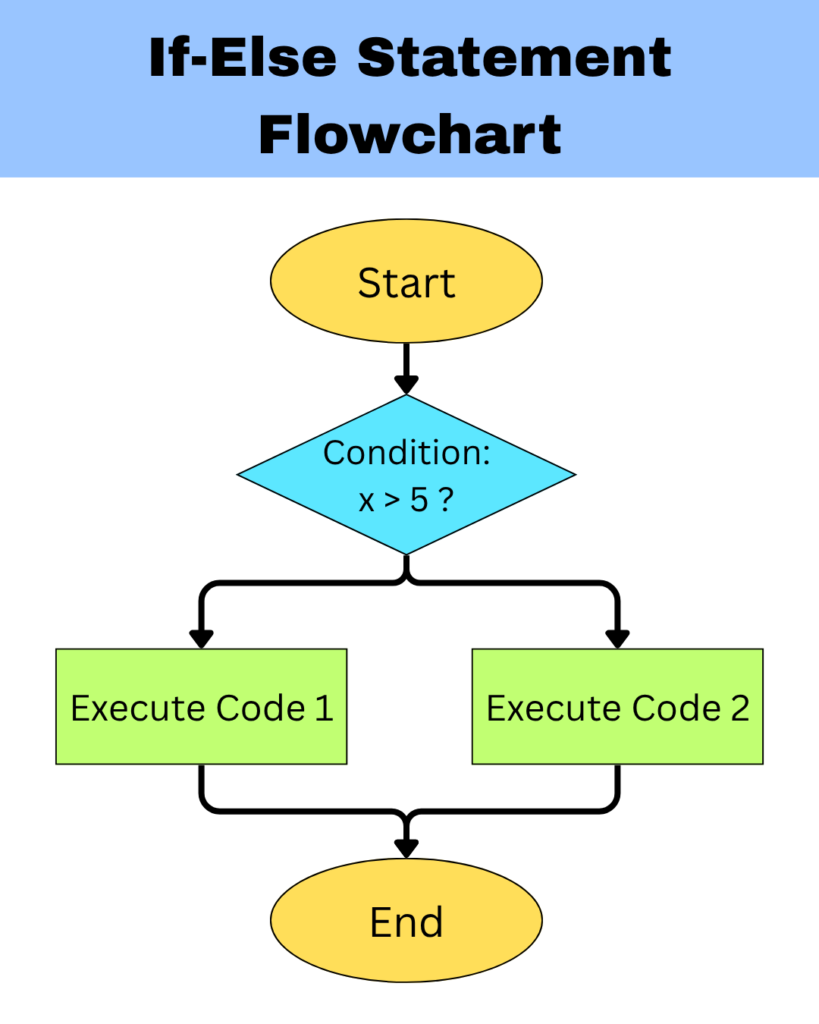
The if-else statement is used where there are two possible outcomes based on a condition. It allows the program to choose between two different blocks of code.
Syntax:
if (condition) {

    // code to execute if condition is true

}
else {

    // code to execute if condition is false

}
If the condition is true, the code inside the if block is executed. If the condition is false, the code inside the else block is executed instead. This ensures that one of the two blocks will always run.
Example 1:
class Test {
    public static void main(String[] args) {
        int x = 3;

        if (x > 5) {
            System.out.println("x is greater than 5");
        }
        else {
            System.out.println("x is less than or equal to 5");
        }
    }
}
Output:
x is less than or equal to 5Example 2:
class Test {
    public static void main(String[] args) {
        int x = 7;

        if (x > 5) {
            System.out.println("x is greater than 5");
        }
        else {
            System.out.println("x is less than or equal to 5");
        }
    }
}
Output:
x is greater than 5Explanation:
- In the first example, the value of x is 3, while the condition is x > 5. Since 3 is less than 5, the condition evaluates to false and the else statement is executed.
In the second example, the value of x is 7 and the condition is x > 5. Since 7 is more than 5, the condition evaluates to true and the if statement is executed.
Where to use:
- You have two possible outcomes
- You want one block to run if true, and another if false
Common use cases:
- Checking even or odd numbers
- Login success or failure
- Comparing two values
3. Ternary Operator (Conditional Operator)
The ternary operator is a shorthand way of writing a simple if-else statement in a single line. It is called “ternary” because it works with three operands: a condition, a value if the condition is true, and a value if the condition is false.
Syntax:
result = (condition) ? expression1 : expression2;The condition is first evaluated. If the condition is true, it returns expression1; otherwise, it returns expression2. This makes it very useful for assigning values based on conditions in a concise way.
For example:
class Test {
    public static void main(String[] args) {
        int x = 10;

        String result = (x > 5) ? "Greater than 5" : "Smaller than 5";
        System.out.println(result);
    }
}
Output:
Greater than 5Explanation:
- The value of x is 10.
- First the condition x > 5 is to be evaluated. Since 10 is more than 5, the condition evaluates to true and expression1, i.e, Greater than 5 is executed.
- If the condition would have evaluated to false, expression2 would have been executed.
Equivalent if-else statement for the above example:
class Test {
    public static void main(String[] args) {
        int x = 10;
        String result;

        if (x > 5) {
            result = "Greater than 5";
        }
        else {
            result = "Smaller than 5";
        }

        System.out.println(result);
    }
}
When to use:
- You have a simple if-else condition
- You want short and clean code in one line
Common use cases:
- Assigning grades or labels
- Finding maximum of two numbers
- Returning values in simple conditions
4. else-if Ladder
The else-if ladder is used when there are multiple conditions to check. It allows the program to evaluate several conditions one after another and execute the first block of code whose condition evaluates to true.
Syntax:
if (condition1) {

    // code to execute if condition is true

}
else if (condition2) {

    // code to execute if condition is true

}
else {

    // code to execute if condition is true

}
The conditions are checked from top to bottom. As soon as one condition is true, its corresponding block of code is executed, and the rest of the conditions are skipped. If none of the conditions are true, the optional else block is executed.
For example:
class Test {
    public static void main(String[] args) {
        int marks = 85;

        if (marks >= 90) {
            System.out.println("Grade A");
        }
        else if (marks >= 75) {
            System.out.println("Grade B");
        }
        else if (marks >= 50) {
            System.out.println("Grade C");
        }
        else {
            System.out.println("Grade D");
        }
    }
}
Output:
Grade BExplanation:
- The conditions are checked from top to bottom.
- First, the condition marks >= 90 is evaluated. Since the value of marks doesn’t satisfy this condition, it evaluates to false.
- The program then moves to the next condition marks >= 75. This condition is evaluated to true. Therefore, the corresponding block of code is executed, and the message is printed.
- All remaining conditions are skipped after this.
When to use:
- You need to check multiple conditions
- Only one condition out of all should execute
- Conditions are different and not fixed values
Common use cases:
- Grading systems
- Menu-based decisions
- Range-based conditions (marks, salary, etc.)
Common Mistake: Using multiple if statements instead of else-if
Consider the following example:
class Test {
    public static void main(String[] args) {
        int marks = 95;

        if (marks >= 90) {
            System.out.println("Grade A");
        }
        if (marks >= 75) {
            System.out.println("Grade B");
        }
    }
}
Output:
Grade A
Grade B
What happened here?
- Each if condition is checked independently.
- If multiple conditions are true, multiple blocks will executed.
NOTE:
Use else-if when only one condition should be executed. Use separate if statements when multiple conditions can be true at the same time.
5. Nested if Statement
A nested if statement is an if statement placed inside another if statement. It is used when one condition depends on another condition.
Syntax:
if (condition1) {
    if (condition2) {

        // code

    }
}
In this structure, the outer if condition is checked first. If it is true, then the inner if condition is evaluated. Only when both conditions are true does the inner block of code execute.
For example:
class Test {
    public static void main(String[] args) {
        int age = 20;
        boolean hasLicense = true;

        if (age >= 18) {
            if(hasLicense) {
                System.out.println("Eligible to drive");
            }
        }
    }
}
Output:
Eligible to driveExplanation:
- First, the outer if condition is checked. Since the assigned age is more than 18, the condition is evaluated to true.
- Now, the inner if condition is checked. Since the inner condition is assigned true, the code gets executed.
- For the code to get executed, both the if conditions should compulsorily evaluate to true.
When to use:
- One condition depends on another
- You need hierarchical decision-making
- Multiple conditions must be true step by step
Common use cases:
- Checking eligibility (age + license)
- Multi-level validation
- Security checks
6. switch Statement
The switch statement is used to select one block of code from multiple options based on the value of a single variable or expression.
Syntax:
switch (expression) {

    case value1:
        // code
        break;

    case value2:
        // code
        break;

    default:
        // code

}
Instead of checking multiple conditions like in an else-if ladder, the switch statement compares the value of an expression with different predefined cases. When a case matches the value, the corresponding block of code is executed.
The break statement is used to stop further execution of cases once a match is found, whereas, the default case is executed when none of the specified cases match the given value.
For example:
class Test {
    public static void main(String[] args) {
        int day = 3;

        switch (day) {

            case 1:
            System.out.println("Monday");
            break;

            case 2:
                System.out.println("Tuesday");
                break;

            case 3:
                System.out.println("Wednesday");
                break;

            default:
                System.out.println("Invalid");

        }
    }
}
Output:
WednesdayExplanation:
- The value assigned to the variable day is 3.
- The switch statement takes the value of the variable and then checks it against each case one by one.
- When matched, the corresponding block of code is executed and the message gets printed.
When to use:
- You are checking a variable against multiple fixed values
- You want a cleaner alternative to multiple else-if statements
Common use cases:
- Days of the week
- Menu options
- Status codes
Common Mistake When Using switch Statement
a) Not using break keyword
Consider the following example:
class Test {
    public static void main(String[] args) {
        int day = 2;

        switch (day) {

            case 1:
                System.out.println("Monday");

            case 2:
                System.out.println("Tuesday");

            case 3:
                System.out.println("Wednesday");

        }
    }
}
Output:
Tuesday
Wednesday
What happened here?
Once a matching case is found, the switch starts executing from that point and continues until it encounters a break or the switch ends. This concept is called fall-through behavior. Thus using the break keyword becomes essential.
b) Using conditions instead of expressions
The switch works with expressions and not conditions. It takes something that produces a fixed value.
But why not conditions? A condition in Java returns either true or false. For example, (x > 5) returns either true or false based on the value of x.
Therefore:
switch (x > 5) // Invalid, since it returns a boolean value
switch (day) // Valid, since it has an assigned value
switch (x + 2) // Valid, since it evaluates to a fixed value
switch (methodName()) // Valid, since a method returns a value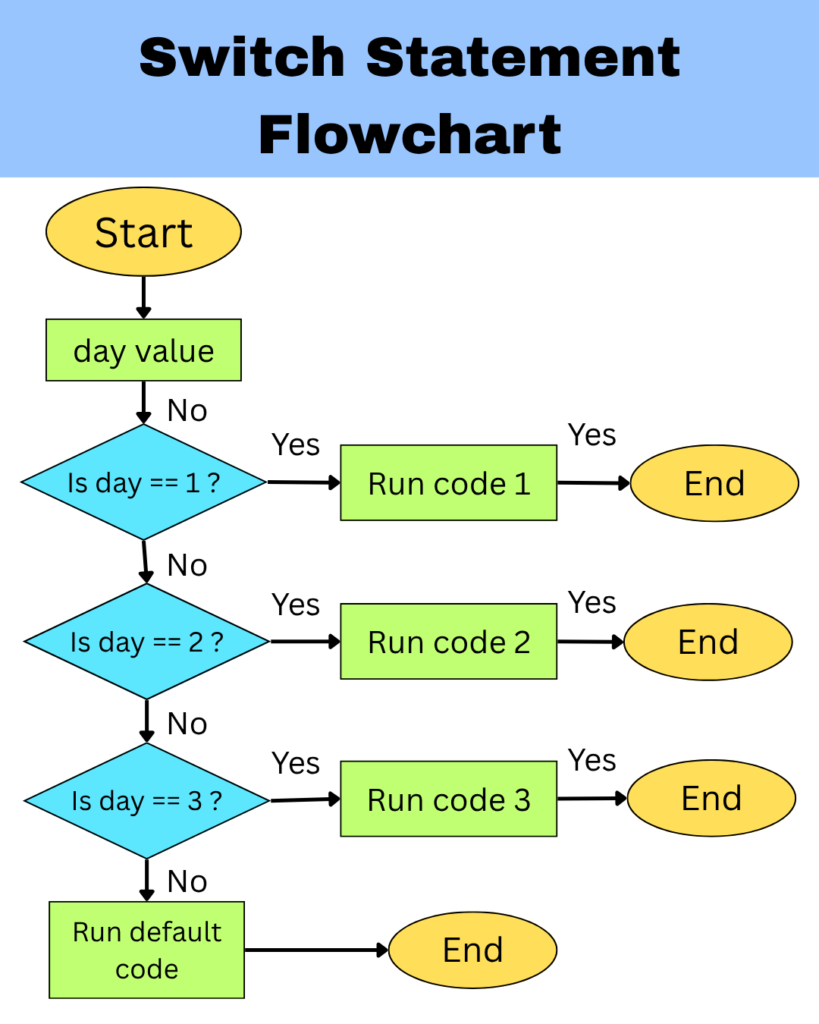
To explore more about conditional statements in Java, you can refer to the official documentation for Java switch statements.
7. Switch Expression (Modern Java)
A switch expression is an improved version of the traditional switch statement introduced in modern Java. It is designed to make code shorter, cleaner, and easier to understand. In earlier versions of Java, the switch statement was mainly used to execute blocks of code. However, in modern Java, the switch can also return a value, i.e., produce a result that can be assigned to a variable, which makes it more powerful and flexible.
A switch expression is a type of switch that evaluates a value and directly returns a result, instead of just executing statements.
Syntax:
result = switch (expression) {

    case value1 -> result1;
    case value2 -> result2;
    default -> defaultResult;

};- A variable (result) is first created which will store the value returned by the switch expression.
- Now, we move to the switch expression. Here, the expression gets evaluated.
- The value is now compared with each case.
- When a matching case is found, the value after ‘- >’ is returned.
- The returned value gets stored in result.
NOTE:
In the switch expression, the output is not printed directly. The switch expression first returns a value, which is then stored in a variable and can be printed or used later.
For example:
class Test {
    public static void main(String[] args) {
        int day = 2;

        String result = switch (day) {

            case 1 -> "Monday";
            case 2 -> "Tuesday";
            case 3 -> "Wednesday";
            default -> "Invalid";

        };

        System.out.println(result);
    }
}
Output:
TuesdayExplanation:
- A variable named result is first created.
- The value of day in the switch expression, which is 2, is evaluated in the switch expression and compared with each case.
- When a matching case is found, the value after ‘- >’ is returned (assigned), i.e. Tuesday.
- This returned value is stored in result.
- Hence, on printing the variable result, the stored value is displayed.
Switch Expression with Multiple Statements
In modern Java, a switch expression can also contain multiple statements inside a case. This is useful when you want to perform more than one operation before returning the final result.
In such cases, instead of writing everything in one line, we use a block of code {}. Inside this block, we use the yield keyword to provide the final value to be returned for that case.
Syntax:
result = switch (expression) {

    case value1 -> {
        // multiple statements
        yield result1;
    }

    case value1 -> {
        // multiple statements
        yield result2;
    }

    default -> {
        yield defaultResult;
    }

};
For example:
class Test {
    public static void main(String[] args) {
        int day = 2;

        String  result = switch (day) {

            case 1 -> {
                System.out.println("Processing Monday");
                yield "Monday";
            }

            case 2 -> {
                System.out.println("Processing Tuesday");
                yield "Tuesday";
            }

            case 3 -> {
                System.out.println("Processing Wednesday");
                yield "Wednesday";
            }

            default -> {
                yield "Invalid";
            }

        };

        System.out.println(result);
    }
}
Output:
Processing Tuesday
Tuesday
Explanation:
- A variable result is created to store the output.
- The value of day is evaluated.
- The switch compares the value with each case.
- When a matching case is found, its block {} is executed.
- All statements inside the block run one by one. In this case, Processing Tuesday gets printed.
- The yield statement provides the final value of that block, which is returned by the switch expression and then stored in the result variable. In this case, Tuesday gets printed.
- Hence, the final value of result is Tuesday.
When to use:
- You want to produce a value based on a condition
- You need to assign the result to a variable
- You want cleaner and shorter code
Common use cases:
- Assigning values (e.g., day name, grade, result)
- Returning values from logic
- Simplifying if-else assignments
Common Mistakes When Using switch Expression
a) Forgetting the Semicolon in Switch Expression
Consider the following example:
String result = switch (day) {

    case 1 -> "Monday";
    default -> "Invalid";

}   // missing semicolon
This causes a compilation error. But why?
Think of it like this
int x = 10;This is a complete assignment statement since it ends with a semicolon.
Since in Java, a switch expression is used to evaluate a condition and return (assign) a value to the variable, a semicolon is required.
Thus the correct code will be:
String result = switch (day) {

    case 1 -> "Monday";
    default -> "Invalid";

};
b) Forgetting to use yield in Multi-Statement Case
Switch expression must return a value to the variable. The yield keyword is responsible for what is to be returned. Therefore, not using the yield statement returns an error.
String result = switch (day) {

    case 1 -> {
        System.out.println("Monday");
        // No value given

};  // Error
To explore more about conditional statements in Java, you can refer to the official documentation for Java switch expressions.
Difference Between If-Else and Switch
| Features | if-else | switch |
|---|---|---|
| Type of check | Works with conditions (true or false) | Works with fixed values |
| Evaluation | Checks conditions one by one | Matches a single value with cases |
| Structure | Flexible and can handle complex logic | More structured and limited |
| Readability | Can become complex with many conditions | Cleaner for multiple fixed options |
| Performance | Slower for many conditions | Faster for fixed values (in many cases) |
| Data types | Works with all types of conditions | Works with int, char, String and enum |
| Use cases | Range-based or logical conditions | Menu, choices, fixed values |
| Default case | Uses else | Uses default |
| Fall-through | Not possible | Possible (if break is missing) |
| Modern Usage | Same as before | Enhanced with switch expressions |