Java Tutorial #8: Arrays in Java and its Operations
April 12, 2026
Table of Contents
What is an Array?
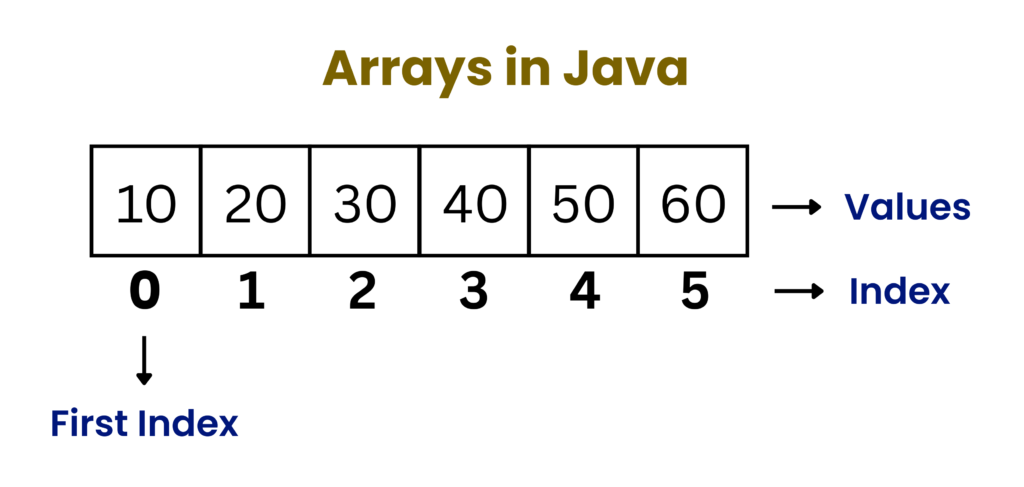
An array is a container object that stores multiple elements of the same data type. It is a linear data structure, meaning all elements are arranged in a single line or sequence.
Each element in the array is identified by an index, which represents its position in the sequence. The index always starts from zero. Therefore, the first element is stored at index 0, the second at index 1, and so on.
Key Characteristics of Arrays in Java
1. Stores multiple values in single variable
Arrays in Java allow you to store many values using just one variable name.
Instead of writing:
int a = 10;
int b = 20;
int c = 30
You can write:
int[] arr = {10,20,30};This makes code cleaner, shorter, and easier to manage, especially when dealing with large amount of data.
2. Elements must be of the same data type
All elements in arrays must belong to the same data type.
For example:
- An int array can only store integers
- A double array can only store decimal numbers
- A String array can only store texts
3. Index-based access (starts from 0)
Each element in an array is accessed using an index (position number).
- The first element is stored at index 0
- The second element is at index 1
- And so on
This system allows direct and fast access to any element without searching through the entire array.
4. Fixed size (Cannot be changed after creation)
When you create an array, you must define their size in advance. Suppose you create an array that can store exactly 5 elements, you cannot decrease or increase its size later. This is an important limitation of arrays in Java
5. Elements are stored in a contiguous memory
When an array is created, all elements are stored next to each other in the memory, like a row of adjacent boxes. Each box has a fixed position (index). Because of this, the computer can quickly calculate the location of any element and the access time becomes very fast since no searching is required.
Creation of Arrays in Java
Declaration of Arrays in Java
Declaration is the process of creating a variable for an array, which will store the location of the array in memory after it is initialized. This variable is called a reference variable. At this stage, the array is not yet created, so the reference variable does not store (points to) any actual memory location yet (it is null).
There are two ways to declare arrays in Java:
dataType[] arrayName;

dataType arrayName[];
In Java, the first method is usually preferred since it provides better readability.
For example:
int[] arr;Explanation:
- int -> specifies the type of elements the array will store
- arr -> the name of the array
- [] -> indicates that the variable is an array
At this stage, no memory is allocated and the array does not contain any elements.
Important points about declaration:
- You can declare arrays of any data type (int, double, char, String, etc.)
- Declaration does not define the size of the array
- Multiple arrays can be declared in a single line.
For example:
int[] a, b, c;Initialization of Arrays in Java
Initialization is the process of allocating a memory to an array so they can store elements. In simpler words, initialization means creating the actual array in memory.
Syntax:
arrayName = new dataType[size];For example:
arr = new int[5];Explanation:
- arr -> declared reference variable
- new ->keyword used to allocate memory
- int -> data type
- 5 -> number of elements the array can store
After initialization:
- Memory is allocated in the heap
- The array can store 5 elements
- Default values are automatically assigned
Declaration and Initialization Together
In most practical cases, declaration and initialization are done in a single step.
Syntax:
dataType[] arrayName = new dataType[size];For example:
int[] arr = new int[5];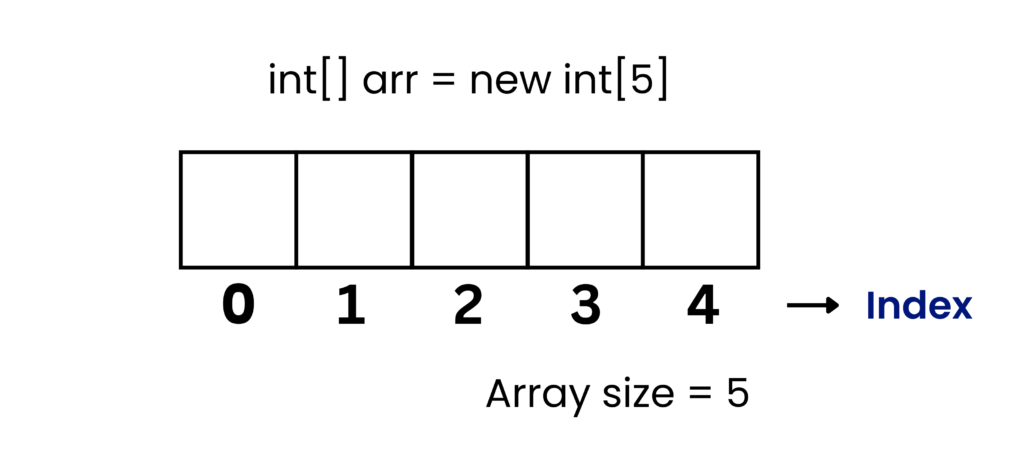
Explanation:
- The array is declared
- Memory is allocated
- Default values are assigned.
- All of this happens in one line
Why this is preferred:
- Cleaner code
- Less chance of errors
- More readable
Initialization of Arrays in Java with Values
Instead of assigning default values, arrays in Java an be directly initialized with specific values. This is useful when you already know the elements and want to avoid assigning values later.
Syntax:
dataType[] arrayName = {value1, value2, value3};For example:
int[] arr = {10, 20, 30, 40, 50};Frequent Errors in Array Declaration and Initialization
1. Using arrays without initialization
int[] arr; // Declaration
arr[0] = 10; // Error: Memory is not allocated yet
2. Mismatch between size and values
int[] arr = new int[2];
arr[2] = 10; // Error: Index out of bounds since an array of size 2 has only index 0 and 1
3. Forgetting new keyword
int[] arr = new int[2]; // Valid

int[] arr = int[2]; // Invalid
Default Array Values in Java
When arrays in Java are initialized without assigning any values, default values are assigned autimatically.
| Data Type | Default Values |
|---|---|
| int | 0 |
| float | 0.0 |
| double | 0.0 |
| boolean | false |
| char | '\u0000' |
| object | null |
Operations on Arrays in Java
Java supports several operations that can be performed on an array:
- Accessing elements
- Updating elements
- Traversal
- Insertion
- Deletion
- Searching
- Sorting
Accessing Elements in an Array
In Java, each element of an array is accessed using an index. Indexing always starts from 0.
Syntax to access an element:
arrayName[index]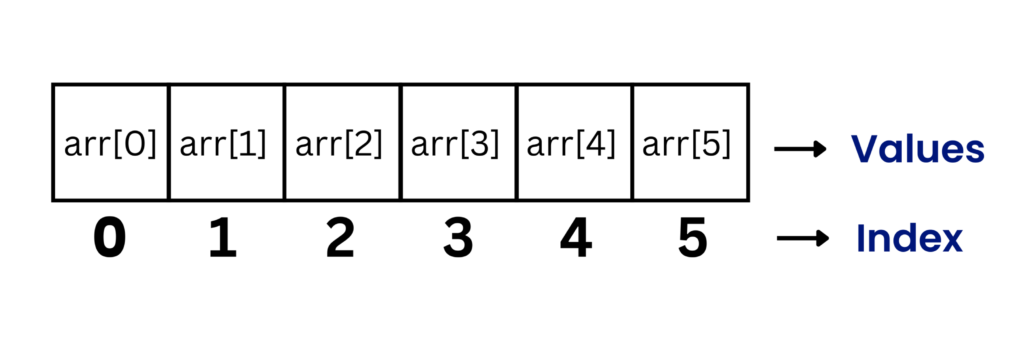
How it works?
- The array name is the reference variable that points to (stores) its location in the memory.
- The index is the position of an element inside the array.
For example:
class Test {
    public static void main(String[] args) {
        int[] arr = {10, 20, 30};
        System.out.println(arr[0]);
        System.out.println(arr[1]);
        System.out.println(arr[2]);
    }
}
Output:
10
20
30
Explanation:
- arr[0] -> 10
- arr[1] -> 20
- arr[2] -> 30
Updating Elements in an Array
Arrays in Java allow direct modification using index positions.
Syntax for updating an element:
arrayName[index] = newValueFor example:
class Test {
    public static void main(String[] args) {
        int[] arr = {10, 20, 30};
        System.out.println("Before update: " + arr[1]);

        arr[1] = 50;
        System.out.println("After update: " + arr[1]);
    }
}
Output:
Before update: 20
After update: 50
Explanation:
- The value at index 1 was initially 20.
- After performing arr[1] = 50, the value at index 1 changed to 50
Traversing an Array
Traversal means visiting each element of the array one by one. It is useful when we want to search/modify the elements, perform calculation on the elements, or print all the elements in the array.
There are two ways to traverse an array:
1. Using for Loop
class Test {
    public static void main(String[] args) {
        int[] arr = {10, 20, 30};
        for(int i = 0 ; i < arr.length ; i++) {
            System.out,println(arr[i]);
        }
    }
}
Output:
10
20
30
Explanation:
- i is initially set to 0 since index starts from 0.
- arr.length stores the size of the array. In this case the size of the array is 3.
- Since the last index of every array is always the array’s size minus 1, variable i iterates only till i = 2.
- If the condition is set to i <= arr.length, then i will iterate till i = 3 and the program will return ArrayIndexOutOfBoundsException
- Now, for every iteration, the value at the particular index is accessed using arr[i]:
- i = 0 : arr[i] -> arr[0] = 10
- i = 1 : arr[i] -> arr[1] = 20
- i = 2 : arr[i] -> arr[2] = 30
b) Using Enhanced for Loop
class Test {
    public static void main(String[] args) {
        int[] arr = {10, 20, 30};
        for(int x : arr) {
            System.out,println(x);
        }
    }
}
Output:
10
20
30
Explanation:
- The enhanced for-loop (for-each loop) works directly with the value of each element, not with its index.
- When int x : arr executes, the variable x takes each element from the array and runs the loop code block.
- Iteration 1: x = 10 -> prints 10
- Iteration 2: x = 20 -> prints 20
- Iteration 3: x = 30 -> prints 30
Insertion in an Array
Insertion means adding a new element at a specific position in the array. Arrays in Java have a fixed size, so you cannot directly add new elements. Instead, you need to create space by shifting elements.
For example:
class Test {
    public static void main(String[] args) {
        int[] arr = new int[5];
        arr[0] = 10;
        arr[1] = 20;
        arr[2] = 30;

        //Insert 25 at index 1
        for (int i=2 ; i>=1 ; i--) {
            arr[i+1] = arr[i];
        }
        arr[1] = 25;

        for (int j=0 ; j<arr.length ; j++) {
            System.out.println(arr[j]);
        }
    }
}
Output:
10
25
20
30
0
Explanation:
An array of size 5 is created, and only the first three indices are assigned values: 10, 20, and 30.
Our goal is to insert 25 at index 1 (between 10 and 20).
To do this, we first need to create space at index 1. So, we shift the elements (20 and 30) one position to the right.
For shifting, we run a loop starting from i = 2, because 30 (the last filled element) is at index 2.
Inside the loop, we copy the value at index i to index i + 1. This effectively moves each element one step to the right.
After each iteration, i is decremented, and the loop continues until i reaches index 1 (i >= 1).
Finally, we insert 25 at index 1.
Deletion in an Array
Deletion means removing an element from a specific position. For deletion, we shift elements to the left to overwrite the element that we want to delete.
For example:
class Test {
    public static void main(String[] args) {
        int[] arr = {10, 20, 30, 40, 50};

        // Delete element at index 1
        for (int i=1 ; i<arr.length-1 ; i++) {
            arr[i] = arr[i+1];
        }

        for (int j=0 ; j<arr.length ; j++) {
            System.out.println(arr[j]);
        }
    }
}
Output:
10
30
40
50
50
Explanation:
An array is created with values: 10, 20, 30, 40, and 50.
Our goal is to delete the element at index 1, which is 20.
To do this, we need to shift all the elements after index 1 one position to the left so that the gap created by deleting 20 is filled.
For shifting, we start a loop from i = 1, since that is the index of the element we want to delete.
Inside the loop, we assign the value at index i + 1 to index i. This moves each element one step to the left.
After each iteration, i is incremented, and the loop continues until i reaches the second last index (arr.length – 2), because the last element has no next element to copy from.
After shifting, the array becomes: 10, 30, 40, 50, 50
The last element remains duplicated, but logically it is not part of the updated array anymore.
Searching in an Array
Searching means finding whether a particular element exists in the array.
For example:
class Test {
    public static void main(String[] args) {
        int[] arr = {10, 20, 30, 40, 50};

        int key = 30;

        // Search for the key

        for (int i=0 ; i<arr.length ; i++) {
            if(arr[i] == key) {
                System.out.println("Found at index:" + i);
            }
        }
    }
}
Output:
2Explanation:
An array is created with values: 10, 20, 30, 40, and 50.
We want to search for a specific value (key), which is 30.
To find the key, we use a loop that starts from index 0 and goes till the last index of the array.
Inside the loop, we compare each element of the array with the key.
If the value at index i is equal to the key, we print the index where the key is found.
The loop continues checking all elements until it reaches the end of the array.
Sorting an Array
Sorting means arranging elements in a specific order. Sorting can be done in two ways – ascending and descending.
For example:
class Test {
    public static void main(String[] args) {
        int[] arr = {30, 10, 40, 50, 20};

        for(int i=0 ; i<arr.length ; i++) {
            for(int j=i+1 ; j<arr.length ; j++) {
                if(arr[i] > arr[j]) {
                        int temp = arr[j];
                        arr[j] = arr[i];
                        arr[i] = temp;
                }
            }
        }
    }
}
Output:
10
20
30
40
50
Explanation:
An array is created with values: 30, 10, 40, 50, and 20.
Our goal is to sort the array in ascending order.
To do this, we use two loops:
The outer loop (i) selects one element at a time.
The inner loop (j) compares that element with all the elements that come after it.
For each value of i, the inner loop starts from j = i + 1 and runs till the end of the array.
Inside the inner loop, we check if the element at index j is smaller than the element at index i.
If it is smaller, we swap both elements using a temporary variable:
Store arr[j] in temp
Assign arr[i] to arr[j]
Assign temp to arr[i]
For every fixed value of i, the inner loop (j) completes its full iteration, comparing arr[i] with all remaining elements.
Only after the inner loop finishes completely, the outer loop (i) moves to the next index.
Because of this process, the smallest element from the remaining unsorted part gets placed at the correct position in each iteration.
NOTE:
If the array is already full, insertion is not possible. It is only possible if there is extra space in the array, or i we create a new array with extra spaces. We can copy all the elements in the new array and the add the extra elements in our desired position.
To explore more about arrays and some more array operations in Java, visit the official Arrays in Java Documentation.
Wrapping Up
Arrays in Java form one of the most important building blocks in programming, especially for beginners who are just starting to understand how data is stored and managed. By learning how arrays work in Java, from declaration and initialization to accessing and updating elements, you develop a clear understanding of how programs handle multiple values efficiently. This foundation is essential because many advanced concepts in programming are built on top of arrays
.
As you explored different operations, you would have noticed that arrays are simple to use and still powerful when it comes to fast data access and organized storage. At the same time, their limitations such as fixed size and costly insertion or deletion show why developers later move to more flexible data structures. Understanding these strengths and limitations helps you make better decisions when choosing the right approach for a problem.
Overall, mastering arrays in Java is not just about learning syntax, but about developing a strong problem solving mindset. Once you are comfortable with arrays, you will find it much easier to move on to more advanced topics like collections, data structures, and algorithms where these concepts are used extensively.