Java Tutorial #7: Loops in Java: for, while, do-while & for-each
April 19, 2026
Table of Contents
What are Loops in Java?
Loops in Java are control flow statements that allow a block of code to be executed repeatedly based on a specified conditions. The loop continues execution until the condition evaluates to false, thereby eliminating the need for redundant code and improving efficiency.
Key Components of a Loop
a) Initialization: -> Initialization is the step where a loop-control variable (controls how many times the loop executes) is declared and assigned its starting value before the loop begins execution. This variable is used to track how many times the loop has executed.
For example, int i = 0 means the loop starts counting from 0.
b) Condition: -> The condition is a boolean expression involving the loop-control variable that is checked before each iteration (in for and while loops). The loop continues to execute as long as this condition evaluates to true, and stops when it becomes false.
For example, i < 5 means the loop runs while i is less than 5.
a) Update Expression: -> The update expression refers to the part where the loop control variable is modified after each iteration of the loop body. This update ensures that the loop moves towards its termination condition.
For example, i++ increases the value of i by 1 after each iteration.
Types of Loops in Java
There are primarily four types of loops in Java:
- for loop
- while loop
- do-while loop
- Enhanced for-each loop
Each of these has its own syntax, behavior, and ideal use case.
for Loop in Java
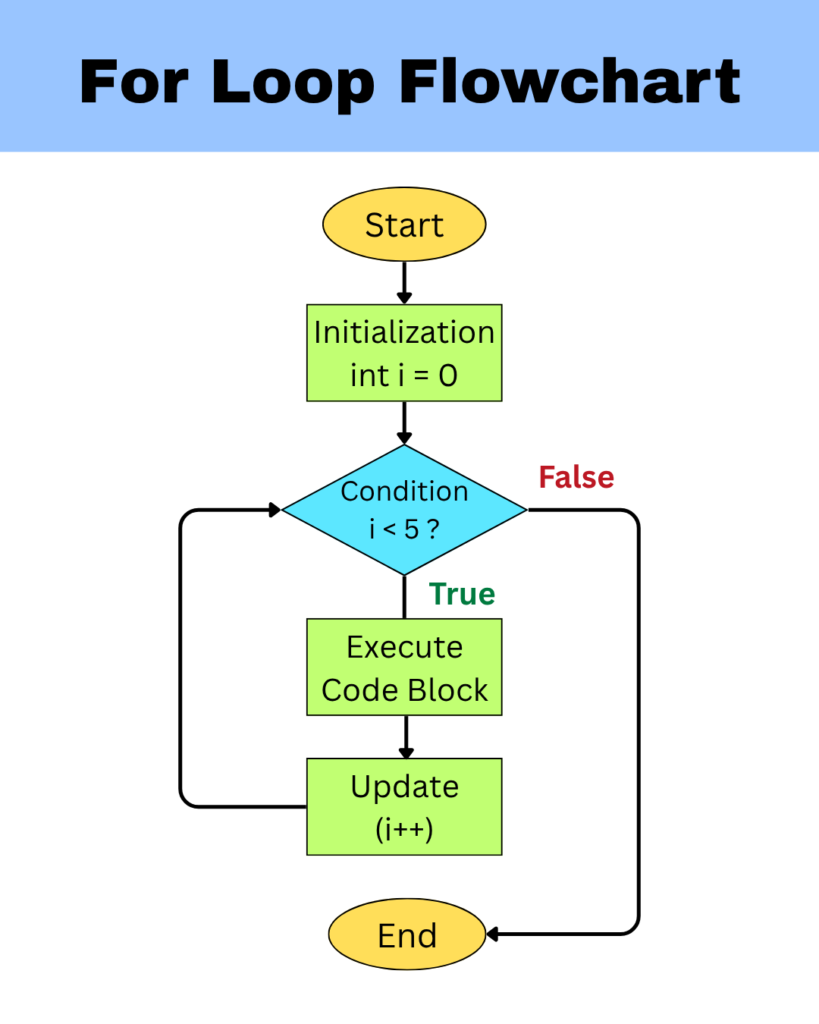
The for loop is one of the most commonly used loops in Java, designed for situations where the number of iterations is known in advance. Among all the other loops, it is considered compact because it combines initialization, condition, and update in a single line.
Syntax:
for (initialisation ; condition ; update) {

    // code block

}
How it works:
- Initialization -> Start counting from a number
- Condition -> Keep going until the condition is true
- Update -> After each step, change the number
For example:
class Test {
    public static void main(String[] args) {
        for (int i = 0 ; i<5 ; i++) {
        System.out.println(i);
    }
}
Output:
0
1
2
3
4
Explanation:
- Iteration i = 0 : 0 < 5 is true -> print 0 -> i gets incremented to 1
- Iteration i = 1 : 1 < 5 is true -> print 1 -> i gets incremented to 2
- Iteration i = 2 : 2 < 5 is true -> print 2 -> i gets incremented to 3
- Iteration i = 3 : 3 < 5 is true -> print 3 -> i gets incremented to 4
- Iteration i = 4 : 4 < 5 is true -> print 4 -> i gets incremented to 5
- Final condition check for i = 5 : 5 < 5 is false -> loop stops
Variations of for loop
a) Infinite for Loop:
Syntax:
for ( ; ; ) {
    System.out.println("Infinite loop");
}
Output:
Infinite Loop
Infinite Loop
Infinite Loop
Infinite Loop
.
.
.
(till infinity)
Explanation:
- No condition means it always runs
- Must use break keyword to exit
b) Multiple variable in for Loop:
Syntax:
for (int i=0,j=10 ; i<j ; i++,j--) {
    System.out.println(i + " " + j);
}
Output:
0 10
1 9
2 8
3 7
4 6
Supports multiple initializations and updates and is used for complex iteration logic.
Explanation:
- Iteration i = 0, j = 10 : 0 < 10 is true -> print 0 10 -> i gets incremented to 1, j gets decremented to 9
- Iteration i = 1, j = 9 : 1 < 9 is true -> print 1 9 -> i gets incremented to 2, j gets decremented to 8
- Iteration i = 2, j = 8 : 2 < 8 is true -> print 2 8 -> i gets incremented to 3, j gets decremented to 7
- Iteration i = 3, j = 7 : 3 < 7 is true -> print 3 7 -> i gets incremented to 4, j gets decremented to 6
- Iteration i = 4, j = 6 : 4 < 6 is true -> print 4 6 -> i gets incremented to 5, j gets decremented to 5
- Final condition check for i = 5, j = 5 : 5 < 5 is false -> loop stops
c) Nested for Loop:
A nested for loop refers to placing one for-loop inside another. When the outer loop runs one iteration, control moves to the inner loop, which then executes completely from start to finish. Only after the inner loop finishes all its iterations does the program return to the outer loop for the next iteration.
class Test {
    public static void main(String[] args) {
        for (int i=0 ; i<=2 ; i++) {
            for (int j=0 ; j<=2 ; j++) {
                System.out.print(i + " " + j + " , ");
            }
        }
    }
}
Output:
0 0 , 0 1 , 0 2 , 1 0 , 1 1 , 1 2 , 2 0 , 2 1 , 2 2Explanation:
- Outer loop iteration i = 0 : 0 <=2 is true
- Inner loop Iteration j = 0 : 0 <=2 is true -> j gets incremented to 1
- Inner loop Iteration j = 1 : 1 <=2 is true -> j gets incremented to 2
- Inner loop Iteration j = 2 : 2 <=2 is true -> j gets incremented to 3
- Final condition check for j = 3 : 3 <= 2 is false -> loop stops
- Outer loop iteration i = 1 : 1 <=2 is true
- Inner loop Iteration j = 0 : 0 <=2 is true -> j gets incremented to 1
- Inner loop Iteration j = 1 : 1 <=2 is true -> j gets incremented to 2
- Inner loop Iteration j = 2 : 2 <=2 is true -> j gets incremented to 3
- Final condition check for j = 3 : 3 <= 2 is false -> loop stops
- Outer loop iteration i = 2 : 2 <=2 is true
- Inner loop Iteration j = 0 : 0 <=2 is true -> j gets incremented to 1
- Inner loop Iteration j = 1 : 1 <=2 is true -> j gets incremented to 2
- Inner loop Iteration j = 2 : 2 <=2 is true -> j gets incremented to 3
- Final condition check for j = 3 : 3 <= 2 is false -> loop stops
- Final condition check for i = 3 : 3 <= 2 is false -> outer loop stops
To explore more about loops in Java, you can refer to the official documentation for Java for loop.
The while Loop in Java
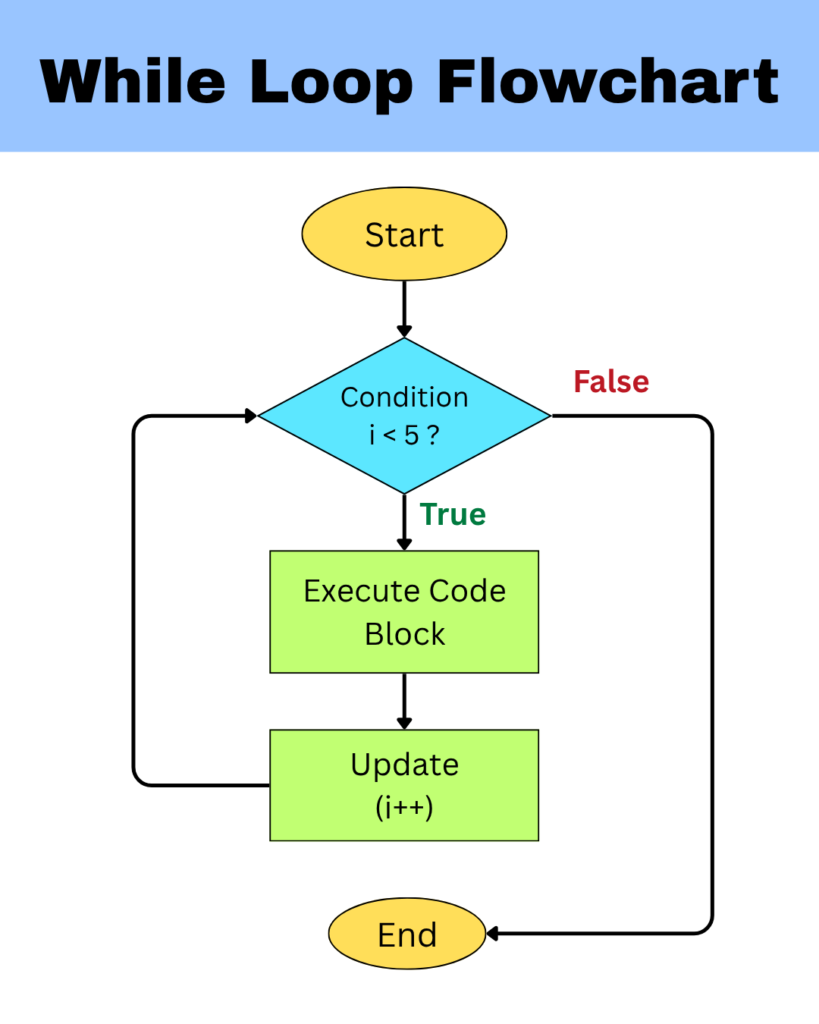
The while loop is an entry-controlled loop that repeatedly executes a block of code as long as the specified condition remains true. It is typically used when the number of iterations is not known in advance.
Syntax:
while (condition) {

    // code block

}
How it works:
- Condition is checked first
- If true, loop body executes
- Repeats until condition becomes false
For example:
class Test {
    public static void main(String[] args) {
        while (true) {
            System.out.println("Infinite loop");
        }
    }
}
Output:
Infinite Loop
Infinite Loop
Infinite Loop
Infinite Loop
.
.
.
(till infinity)
Explanation:
- Iteration i = 0 : 0 < 5 is true -> print 0 -> i gets incremented to 1
- Iteration i = 1 : 1 < 5 is true -> print 1 -> i gets incremented to 2
- Iteration i = 2 : 2 < 5 is true -> print 2 -> i gets incremented to 3
- Iteration i = 3 : 3 < 5 is true -> print 3 -> i gets incremented to 4
- Iteration i = 4 : 4 < 5 is true -> print 4 -> i gets incremented to 5
- Final condition check for i = 5 : 5 < 5 is false -> loop stops
Variations of while loop
a) Infinite while Loop:
class Test {
    public static void main(String[] args) {
        while (true) {
            System.out.println(i);
            i++;
        }
    }
}
Output:
0
1
2
3
4
.
.
.
(till infinity)
Explanation:
- The while loop runs until the condition is true, and here the condition itself is the keyword true
- Must use break keyword to exit
The do-while Loop in Java
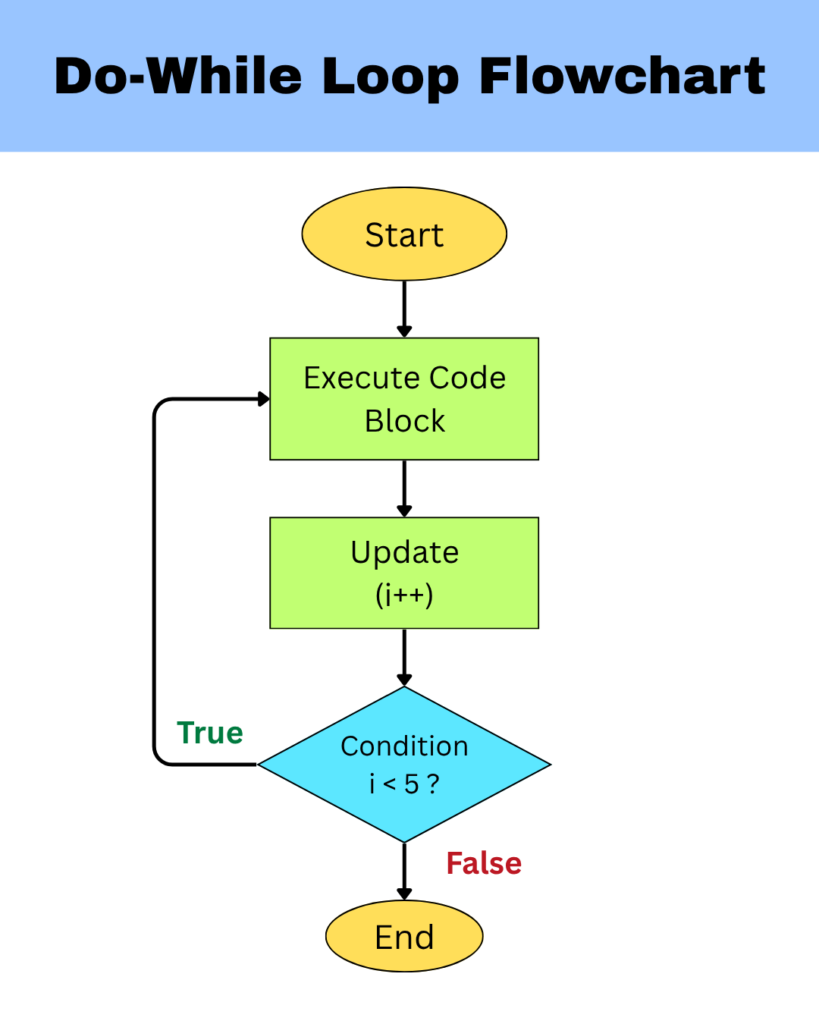
The do-while loop is similar to the while loop but guarantees that the loop body executes at least once regardless of the condition. In this type of loop, the condition is evaluated after the execution of the loop body.
Syntax:
do {

    // code block

} while (condition);
How it works:
- The loop body executes first
- Condition is checked afterwards
- Loop repeats only if the condition is true
For example:
class Test {
    public static void main(String[] args) {
        int i = 0;

        do {

            System.out.println(i);
            i++;

        } while (i < 5);
    }
}
Output:
0
1
2
3
4
Explanation:
- Iteration i = 0 : print 0 -> i gets incremented to 1 -> 1 < 5 is true
- Iteration i = 1 : print 1 -> i gets incremented to 2 -> 2 < 5 is true
- Iteration i = 2 : print 2 -> i gets incremented to 3 -> 3 < 5 is true
- Iteration i = 3 : print 3 -> i gets incremented to 4 -> 4 < 5 is true
- Iteration i = 4 : print 4 -> i gets incremented to 5 -> 5 < 5 is false -> loop stops
To explore more about loops in Java, you can refer to the official documentation for Java while and do-while loop.
The Enhanced for Loop in Java
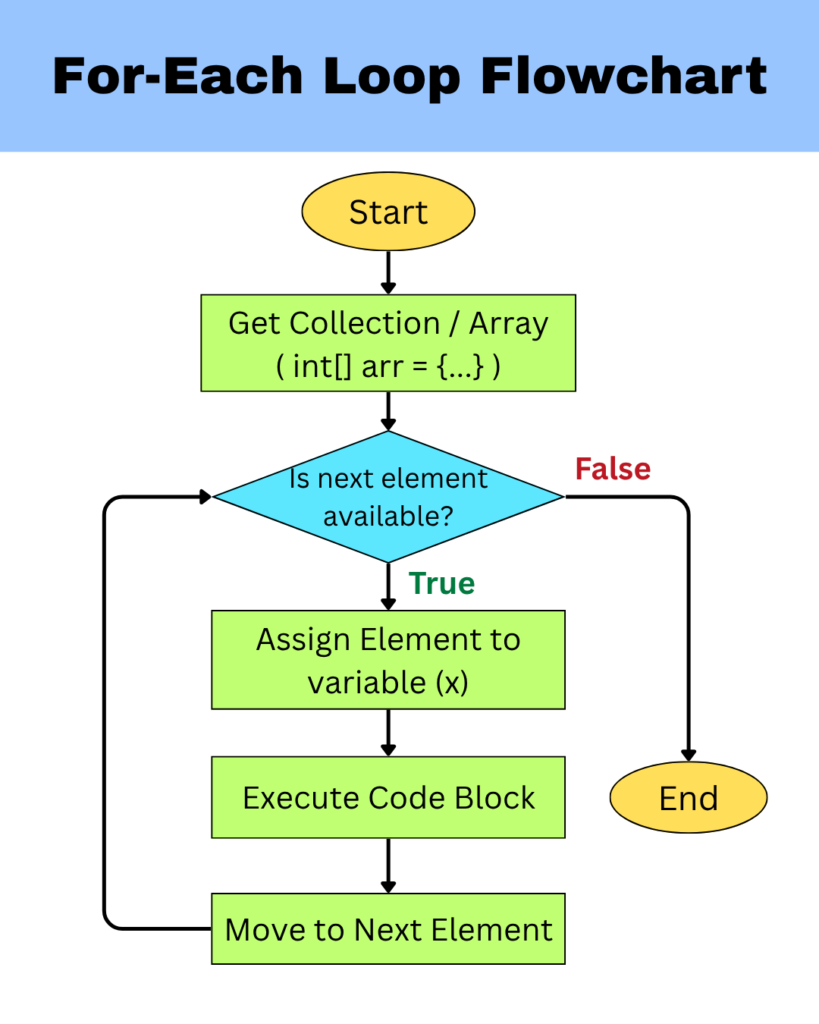
The enhanced for loop (also called the for-each loop) is a simplified loping construct used to iterate over elements of arrays and collections sequentially, without using an index variable.
Syntax:
for (dataType variable : collection) {

    // code block

}
How it works:
- The loop picks the first element from the array or collection
- That element is stored in a temporary variable whose data type matches the data type of the elements in the array or collection.
- The loop body executes using that value
- The loop then moves to the next element of the array or collection
- This process continues until all elements are processed
- Once all elements are covered, the loop stops automatically
For example:
class Test {
    public static void main(String[] args) {
        int[] arr = {10, 20, 30};

        for (int x : arr) {
            System.out.println(x);
        }
    }
}
Output:
10
20
30
Explanation:
- Iteration 1: First element (10) -> x = 10 ->print 10</li
- Iteration 2: Second element (20) -> x = 20 ->print 20
- Iteration 3: Third element (30) -> x = 30 ->print 30
Limitations of Enhanced for loop:
- Works only for arrays and iterable collections
- Cannot traverse in reverse order
- Cannot access index of elements because it works directly with the elements instead of positions
- The temporary variable used stores a copy of the element from the collection, and not the original element itself. Hence, making any changes on the temporary variable does not affect the actual array or collection. For example, performing x = x + 1 will only change the value stored in x, which has a copy of the element
- Limited control compared to for loop since there is no manual control over initialization or update logic and it always runs full iterations
Loop Control Statements in Java
When working with loops in Java, sometimes situations arise where you may want to exit a loop early, skip certain iterations, or control the flow of execution more precisely. This is where loop control statements in Java become important.
Loop control statements make the program more efficient and flexible. Instead of strictly following the loop condition from start to end, these statements give you the ability to control how and when the loop should continue or stop.
Types of Loop Control Statements in Java
Java provides three main loop control statements:
- break
- continue
- Labeled break and continue
Let us now understand each loop control statement in detail.
1. break Statement
In Java, the break statement is used to immediately terminate the loop, regardless of whether the loop condition is still true. Once a break statement is executed, control moves to the next statement after the end of the loop.
For example:
class Test {
    public static void main(String[] args) {
        for (int i = 0 ; i<5 ; i++) {
            if(i == 3) {
                break;
            }
            System.out.println(i);
        }
    }
}
Output:
0
1
2
Explanation:
- Iteration i = 0 -> 0 < 5 is true -> 0 == 3 is false -> print 0 -> i increments to 1
- Iteration i = 1 -> 1 < 5 is true -> 1 == 3 is false -> print 1 -> i increments to 2
- Iteration i = 2 -> 2 < 5 is true -> 2 == 3 is false -> print 2 -> i increments to 3
- Iteration i = 3 -> 3 < 5 is true -> 3 == 3 is true -> break executes and loop stops immediately
Use cases:
- Stop searching when element is found
- Exit loop when condition is met early
- Improve performance by avoiding extra iterations
Common Mistakes:
- Using break unintentionally resulting in the loop to stop too early
- Using the break statement outside a conditional block (if block) causing the loop to run only once
2. continue Statement
In Java, the continue statement is used to skip the current iteration and move directly to the next iteration of the loop.
For Example:
class Test {
    public static void main(String[] args) {
        for (int i=0 ; i<5 ; i++) {
            if (i == 2) {
                continue;
            }
            System.out.println(i);
        }
    }
}
Output:
0
1
3
4
Explanation:
- Iteration i = 0 -> 0 < 5 is true -> 0 == 2 is false -> print 0 -> i increments to 1
- Iteration i = 1 -> 1 < 5 is true -> 1 == 2 is false -> print 1 -> i increments to 2
- Iteration i = 2 -> 2 < 5 is true -> 2 == 2 is true -> continue executes -> current iteration stops and remaining code inside loop is skipped -> next iteration begins -> i increments to 3
- Iteration i = 3 -> 3 < 5 is true -> 3 == 2 is false -> print 3 -> i increments to 4
- Iteration i = 4 -> 4 < 5 is true -> 4 == 2 is false -> print 4 -> i increments to 5
- Iteration i = 5 -> 5 < 5 is false -> loop stops
Use cases:
- Skip unwanted values
- Filter data during iteration
- Ignore for specific conditions
Common Mistakes:
- Using continue instead of break in infinite while loop
3. Labeled break and continue Statement
When using break and continue in nested loops in Java, They affect only the innermost loop by default. To control outer loops instead, labeled statements are used.
A label is like giving a name to the outer loop so you can directly control it.
Example for Labeled break:
class Test {
    public static void main(String[] args) {
        outer:
        for (int i=0 ; i<3 ; i++) {
            for (int j=0 ; j<3 ; j++) {
                if (j == 2) {
                    break outer;
                }
                System.out.println(i + " " + j);
            }
        }
    }
}
Output:
0 0
0 1
Explanation:
- The outer for loop is labeled as outer.
- Outer loop iteration i = 0 : 0 < 3 is true
- Inner loop iteration j = 0 : 0 < 3 is true -> 0 == 2 is false -> print 0 0 -> j increments to 1
- Inner loop iteration j = 1 : 1 < 3 is true -> 1 == 2 is false -> print 0 1 -> j increments to 2
- Inner loop iteration j = 2 : 2 < 3 is true -> 2 == 2 is true -> break outer executes -> terminates the entire outer loop along with the inner loop
Example for Labeled continue:
class Test {
    public static void main(String[] args) {
        outer:
        for (int i=0 ; i<3 ; i++) {
            for (int j=0 ; j<3 ; j++) {
                if (j == 2) {
                    continue outer;
                }
                System.out.println(i + " " + j);
            }
        }
    }
}
Output:
0 0
0 1
1 0
1 1
2 0
2 1
Explanation:
- The outer for loop is labeled as outer.
- Outer loop iteration i = 0 : 0 < 3 is true
- Inner loop iteration j = 0 : 0 < 3 is true -> 0 == 2 is false -> print 0 0 -> j increments to 1
- Inner loop iteration j = 1 : 1 < 3 is true -> 1 == 2 is false -> print 0 1 -> j increments to 2
- Inner loop iteration j = 2 : 2 < 3 is true -> 2 == 2 is true -> break continue executes -> inner loop stops immediately and skips to the next iteration of the outer loop i = 1
- Outer loop iteration i = 1 : 1 < 3 is true
- Inner loop iteration j = 0 : 0 < 3 is true -> 0 == 2 is false -> print 1 0 -> j increments to 1
- Inner loop iteration j = 1 : 1 < 3 is true -> 1 == 2 is false -> print 1 1 -> j increments to 2
- Inner loop iteration j = 2 : 2 < 3 is true -> 2 == 2 is true -> break continue executes -> inner loop stops immediately and skips to the next iteration of the outer loop i = 2
- Outer loop iteration i = 2 : 2 < 3 is true
- Inner loop iteration j = 0 : 0 < 3 is true -> 0 == 2 is false -> print 2 0 -> j increments to 1
- Inner loop iteration j = 1 : 1 < 3 is true -> 1 == 2 is false -> print 2 1 -> j increments to 2
- Inner loop iteration j = 2 : 2 < 3 is true -> 2 == 2 is true -> break continue executes -> inner loop stops immediately and skips to the next iteration of the outer loop i = 3
- Outer loop iteration i = 3 : 3 < 3 is false -> outer loop stops
To explore more about loops in Java, you can refer to the official documentation for Java branching statements.
NOTE:
Unlike break which exits a loop, the return statement exits the entire method and stops all further execution. We will explore the return statement in detail in a later tutorial on Java methods.