Java Tutorial #4: Type Casting in Java and How It Really Works
March 29, 2026
In Java, every variable has a defined data type, and that data type determines what kind of values it can store. But in real-world programming, situations often arise where you need to convert one type of data into another. This process is known as type casting.
Think of type casting like transferring liquid between jars of different sizes. Pouring liquid from a small jar into a larger one is smooth and safe, but pouring liquid from a larger jar to a smaller one can lead to overflow or loss. Similarly, in Java, some conversions are safe and automatic, while others require careful handling. Mastering type casting helps you write more precise, predictable, and efficient programs.
Table of Contents
What is Type Casting in Java?
Type casting in Java is the process of converting a variable from one data type to another. It allows a programmer to manage how data behaves when different types of values are used together in a program.
Java is a strongly typed language, which means every variable must have a fixed data type. Because of this, Java does not always allow one type to be used as another directly. So, when you want to change a value from one type to another, you need type casting. This helps avoid errors and makes sure your program runs correctly.
For example, if we want to convert an integer into a decimal number, Java can perform the conversion on its own, but when converting a decimal into an integer number, you need to do it manually.
Why is Type Casting Needed in Java?
Type casting is used in many real situations while coding. Some common reasons are:
- Working with different data types: When you need to deal with two different values like int and double, Java needs them to be in a common form.
- Controlling decimal values: Sometimes you may want to remove decimals or get a more precise result.
- Saving memory (in some cases): You may convert a larger data type into a smaller one carefully to save memory.
- Avoiding errors:Java does not allow unsafe conversions automatically. so type casting casting helps fix such issues. For example, converting a double to int removes the decimal part of the number resulting in data loss. Thus this operation can only be performed manually.
Java Data Types Hierarchy
In Java, data types follow a fixed hierarchy that determines how values can be converted from one type to another. Smaller data types can be automatically converted into larger ones, while the reverse requires manual casting. This hierarchy helps us understand which conversions are safe and which may lead to data loss.
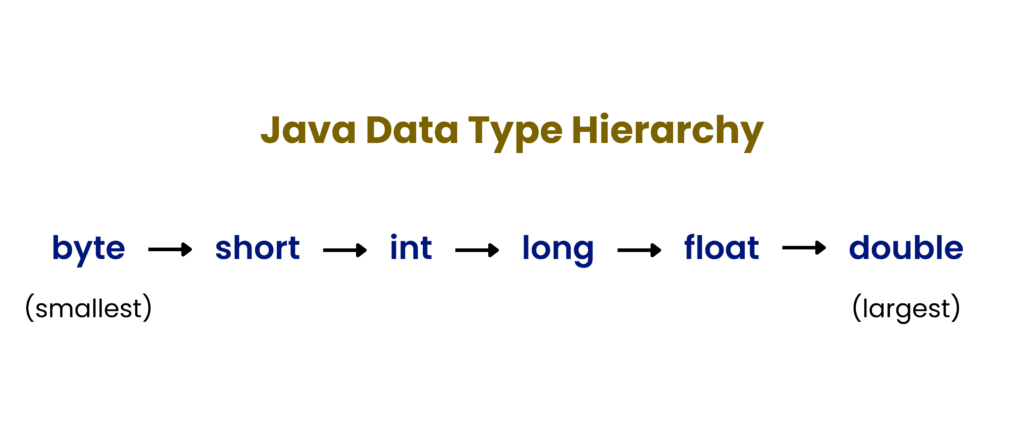
Moving from left to right is safe (implicit), while moving from right to left is explicit casting.
For a better understanding of data types and their ranges, you can refer to the official Java primitive data types documentation.
Types of Type Casting in Java
Type casting in Java is broadly divided into two types:
- Implicit Type Casting (Widening)
- Explicit Type Casting (Narrowing)
1. Implicit Type Casting (Widening)
Implicit type casting, also known as widening, happens automatically when you convert a smaller data type into a larger data type.
Example:
class Test {
    public static void main(String[] args) {
        int x = 10;
        double y = x;
        System.out.println(y);
    }
}
Output:
10.0Here, the integer value 10 is automatically converted into a double value 10.0 by Java. This happens because a double can store all possible values of an int without any loss of data, meaning double has more space and can store decimals making the conversion safe and hence Java automatically does this without any special syntax.
Here are some more examples:
class Test {
    public static void main(String[] args) {
        byte a = 5;
        int b = a;
        System.out.println(b);  // Output: 5

        float f = 10f;
        double d = f;
        System.out.println(d)   // Output: 10.0
    }
}
Key features of Implicit Type Casing in Java:
- Done automatically by Java
- No data loss
- No special syntax required
- Safe and predictable
- Improves code readability
Special Case (Character Conversion):
class Test {
    public static void main(String[] args) {
        char ch = 'A';
        int x = ch;
        System.out.println(x);
    }
}
Output:
65Characters are converted to their Unicode values automatically.
NOTE:
Java uses Unicode to store characters. For common characters like ‘a’, the Unicode value is the same as ASCII (65). This is why ‘A’ gets converted to 65 when cast to an integer.
2. Explicit Type Casting (Narrowing)
Explicit type casting, also known as narrowing is the conversion of a larger data tpe into a smaller one. Since this conversion may result in data loss, Java requires you to perform it manually.
Syntax:
targetType variable = (targetType)value;Example:
class Test {
    public static void main(String[] args) {
        double x = 10.75;
        int y = (int) x;
        System.out.println(y);
    }
}
Output:
10In this example, the decimal part .75 is lost because an int cannot store fractional values.
Here’s another example:
class Test {
    public static void main(String[] args) {
        double x = 7.99;
        int y = (int) x;
        System.out.println(y);   // Output: 7
    }
}
Key Features of Explicit Type Casting in Java:
- Done manually by programmer
- Data Loss is possible
- Requires proper syntax
- Can cause unexpected results
- Must be used carefully
Implicit vs Explicit Type Casting in Java
| Features | Implicit Casting | Explicit Casting |
|---|---|---|
| Conversion | Converts smaller data types to larger | Converts larger data types to smaller |
| How it Happens | Done automatically by Java | Done manually by programmer |
| Data Safety | No data loss (safe conversion) | Data loss may occur |
| Syntax Required | No special syntax needed | Requires (type) casting syntax |
| Control | Controlled by Java | Controlled by Programmer |
How Type Casting Works in Java
Consider the following example:
class Test {
    public static void main(String[] args) {
        long x = 3000000000L;    // 3 billion (greater than int range)
        int y = (int) x;
        System.out.println(y);
    }
}
Output:
-1294967296Mechanism:
- Java stores all integer values in binary format using a system called two’s complement.
- long data type occupies 8 bytes (64 bits) in memory whereas int occupies 4 bytes (32 bits).
- During conversion from long to int, only 4 bytes (32 bits) from right to left is considered and the first 32 bits get removed.
- After removal, if the first (leftmost) bit is 0, the number is positive and Java simply converts the binary number to decimal normally.
- But if the first (leftmost) bit is 1, Java performs two’s complement decoding:
- Take the binary number
- invert all bits (0 -> 1, 1 -> 0)
- Add 1
- Convert the result to decimal
- Add a negative sign
Type Promotion in Java
Type promotion in Java is the process where smaller data types are automatically converted into a larger data type when performing operations like addition, subtraction, multiplication, etc. This happens because Java needs to make sure that calculations are done safely and accurately, without loosing data during the operation.
Why Does Type Promotion Happen?
When you perform operations on different data types without explicit conversion, Java “upgrades” the smaller type to a common larger type before performing calculations.
Example:
class Test {
    public static void main(String[] args) {
        byte a = 10;
        byte b = 20;
        int c = a + b;
        System.out.println(c);  // Output: 30 (Data type: int)
    }
}
Explanation:
Variable ‘a’ and ‘b’ are of type byte, but during addition, both are promoted to int so that calculation can be done safely without overflow.
In simpler words, both are promoted to int so that if the result is larger than the range of byte, it can still be stored safely without data loss.
Another Example:
class Test {
    public static void main(String[] args) {
        int a = 10;
        double b = 5.5;
        double c = a + b;
        System.out.println(c);  // Output: 30 (Data type: double)
    }
}
Type Promotion Rules
- byte, short, and char -> promoted to int
- If one operand is long -> result becomes long
- If one operand is float -> result becomes float
- If one operand is double -> result becomes double
Common Mistake (Very Important)
byte a = 10;
byte b = 20;
byte c = a + b;
System.out.println(c);  // Error
Explanation:
Here, the result of a + b is supposed to of int data type, and you cannot store an int data inside a byte type variable without type casting.
Hence a valid syntax would be:
byte a = 10;
byte b = 20;
byte c = (int)(a + b);  // (or) int c = a + b;
Type Casting with Boolean
In Java, boolean is completely different from numeric data types. Thus, neither can a boolean be converted to any other type, nor can any other type be converted to a boolean.
Example:
boolean b = true;
int x = (int) b;    //Compilation Error
Type Casting in Division
One of the most common mistakes beginners make is with division.
Example 1: Integer Division
class Test {
    public static void main(String[] args) {
        int a = 5;
        int b = 2;
        double result = a / b;
        System.out.println(result);
    }
}
Output:
2.0Explanation:
We expected the result to be 2.5, but instead we got 2.0 as output. This is because:
- Both the operands are initially integers
- a / b is calculated to be 2 (since its still in integer form)
- Then it is converted to double -> 2.0
Example 2: Correct Approach
class Test {
    public static void main(String[] args) {
        int a = 5;
        int b = 2;
        double result = (double) a / b;
        System.out.println(result);
    }
}
Output:
2.5Explanation:
In this case, { (double) a } converts a to double first. Now the result is calculated using Type Promotion.
Best Practices for Type Casting in Java
While using type casting in Java, it is important to avoid errors and unexpected results.
Here are some best practices below:
- Avoid unnecessary conversions as they can make code harder to read and understand.
- Be careful about data loss when converting from a larger data type to a smaller one.
- It is generally better to use larger data types like int or double for calculations instead of smaller types like byte or short.
- Casting should be done before performing operations if you want accurate results. For example:
double result = (double) 5 / 2;- Understand type promotion rules , especially that byte, short, and char are automatically converted to int during aritheatic operation.
- Always a good idea to test your code with different values, including large numbers and decimal values, to ensure that type casting behaves correctly in all cases.