Java Tutorial #3: Variables and Data Types in Java
April 19, 2026
When you start learning Java, one of the very first and most important concepts you encounter is variables and data types in Java. These form the backbone of any Java program because they define how data is stored, manipulated, and used throughout your code.
In this complete guide, we will not only cover the basics of variables and data types in Java, but also explore advanced and modern concepts like type inference (var), literals, Unicode, escape sequences, default values, and Null values.
By the end of this tutorial, you will have a deep and practical understanding of how data is stored and manipulated in java.
Table of Contents
What are Variables?
A variable in Java is a named memory location used to store data that can be changed during the execution of a program. It acts as a container that holds values which can be accessed and modified. Think of a variable as a labeled box. The label is the variable name and the content inside is the value.
For example:
int x = 10;Here,
- int -> Data type
- x -> Variable name
- 10 -> Value stored
Variable Declaration VS Variable Initialization
In Java, working with variables involves two important steps: declaration and initialization. Understanding the difference between these two is essential for writing correct and efficient programs.
Variable Declaration
Variable declaration is the process of defining a variable by specifying its data type and name, without assigning any value to it.
At this stage, the variable is created in memory, but it does not contain any meaningful data.
int x;Here, a variable ‘x’ is declared but no value is assigned to it yet.
Variable Initialization
Variable initialization is the process of assigning a value to a variable after it has been declared.
x = 10;Now the variable is initialized with the value 10.
In most cases, variables are declared and initialized in a single step for convenience and better readability.
For Example:
int x = 10;Which is the same as:
int x;
x = 10;
Java also allows initializing multiple variables in a single line where each variable is assigned its own value:
int a = 10, b = 20, c = 30;# Important Note: Local variables must be initialized before use. If you try to use a variable without assigning a value, Java will throw a compile-time error.
int x;
System.out.println(x); // Error: variable might not have been initialized
Rules for Naming Variables
In Java, some rules are to be followed when naming a variable:
Must start with a letter, _, or $
Cannot start with a number
Cannot use Java keywords (like int, class, etc.)
Case-sensitive (age and Age are different)
For example:
int age = 25; // valid
int _count = 10; // valid
int $price = 50; // valid
int 2num = 5; // invalid
Data Types in Java
Data types in Java define what kind of data a variable can store. Each data type in Java has a fixed size, meaning it occupies a specific amount of memory. Java is strongly typed language, which means every variable must be declared with a specific data type before it is used.
There are two types of Data types in Java:
- Primitive Data Types
- Non-Primitive Data Types
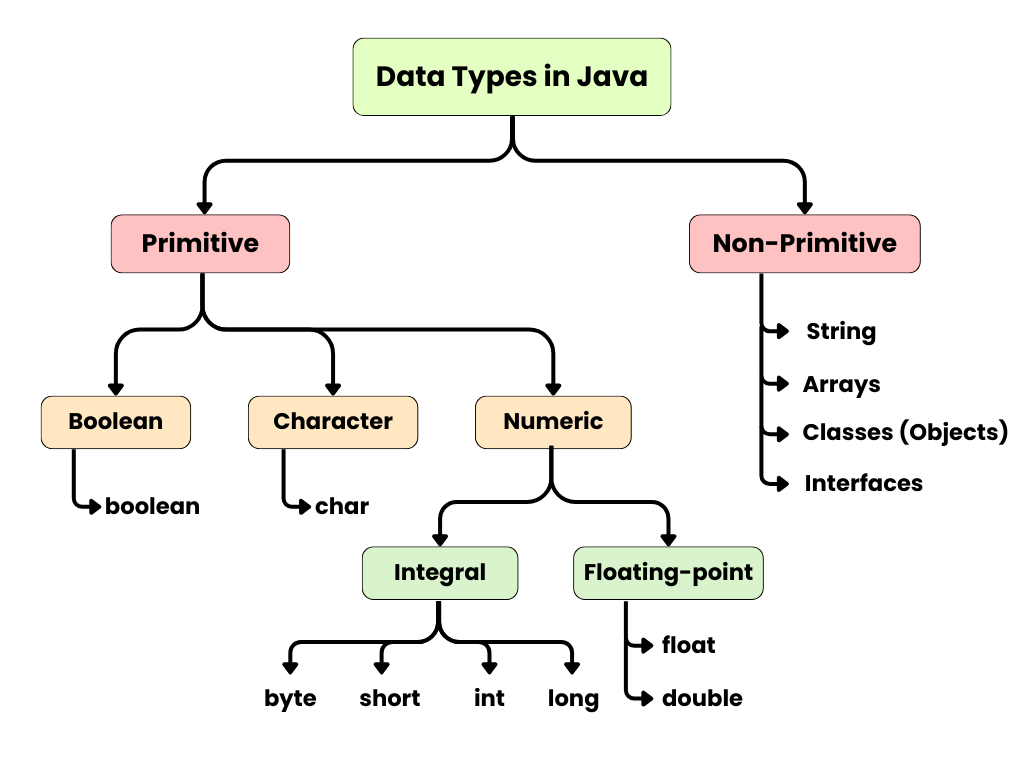
1. Primitive Data Types in Java
Primitive data types are the basic built-in data types in Java that store simple values directly in memory. They do not have fields or methods like objects do.
| Type | Size | Example | Range |
|---|---|---|---|
| int | 4 bytes | 10, 22, 151 | -2,147,483,648 to 2,147,483,647 |
| float | 4 bytes | 10.5f, 4.2f, 27.6f | −3.4×10^38 to 3.4×10^38 approx. (6-7 decimal precision) |
| double | 8 bytes | 10.5, 4.2, 27.6 | −1.7×10^308 to 1.7×10^308 approx. (15-16 decimal precision) |
| char | 2 bytes | 'A', 'c', 'R' | 0 to 65,535 (Unicode characters) |
| boolean | 1 bit | true, false |
For example:
int a = 100;
float b = 10.5f;
double c = 4.2;
char d = 'A';
boolean e = true;
float is a single-precision (32-bit) floating point type, while double is a double-precision (64-bit) type, meaning float stores decimal numbers with fewer digits compared to double, hence double data type stores more accurate values. We use double when we aim for accuracy, and float when our goal is to save memory.
By default, decimal numbers are treated as double, so when we need to create a variable with a float value, we use f or F to explicitly tell the compiler that the value is a float, otherwise the value by default will still be considered as a double.
For a deeper understanding, you can refer to the official documentation provided by Oracle – primitive data types in Java.
2. Non-Primitive Data Types in Java
Non-primitive data types in Java store a reference (memory address) to where the value is stored, instead of storing the value itself. In other words, it points to the location where the actual data is stored. They are used to work with objects, arrays, and strings.
Common non-primitive data types include:
- String
- Arrays
- Classes (Objects)
- Interfaces
In the upcoming tutorials of this series, we will explore these concepts in much greater detail.
Literals in Java
A literal in Java refers to a fixed value that is directly written in the code and assigned to a variable. Following are the types of literals:
int x = 10;             // integer
int bin = 0b1010        // binary
int hex =  0x1A;        // hexadecimal
float f = 3.14f         // float
char ch = 'A';          // char
String S = "Hello";     // string
boolean flag = true;    // boolean
Unicode in Java
In java, unicode refers to a standard character encoding system that allows representation of chanracters from multiple languages using unique codes. Java uses Unicode internally making it platform-independent and globally compatible.
| Unicode | Meaning |
|---|---|
| '\u0041' | Character 'A' |
| '\u0061' | Character 'a' |
| '\u0031' | Character '1' |
Escape Sequence in Java
In Java, escape sequence are special character combinations (starting with ‘\’) used inside strings to add formatting like new line, tab, or quotes. Here are a few commonly used escape sequences:
| Unicode | Meaning |
|---|---|
| \n | Moves cursor to next line |
| \t | adds a tab space between text |
| \" | Adds a double quotes inside a string |
| \' | Adds a single quotes inside a string |
| \\ | Adds a backslash inside a string |
| \b | Used to remove the previous character |
| \r | Moves cursor to the start of the line |
| \f | Creates a new page or break in text |
Type Inference in Java (var)
Type inference in Java allows the compiler to automatically determine the variable’s data type using the var keyword based on the assigned value. It helps make code shorter and easier to write and was introduced in Java 10. It can only be used for local variables.
| Declaration | Inferred Type |
|---|---|
| var x = 10; | int |
| var name = "Java"; | String |
| var pi = 3.14; | double |
In the upcoming tutorials of this series, we will explore local, instance, and static variables in detail.
Points to be considered when using var:
- var cannot be used without assigning a value since the compiler needs a value to determine the type.
- After compilation, the variable’s type gets fixed.
- var has limited usage and can not be used for instance variables, method parameters, and return types.
- It should only be used when the type is obvious, otherwise it can reduce readability.
Default Values in Java
Default values are the values that Java automatically gives to variables when you do not assign any values to them. Default values are assigned only to instance and static variables; local variables do not receive any default value and must be initialized before use.
| Data Type | Default Values |
|---|---|
| int | 0 |
| float | 0.0 |
| double | 0.0 |
| char | '\u0000' |
| boolean | false |
| String | null |
Null Values in Java
A null value represents the absence of a reference, meaning the variable does not point to any object in memory. It is commonly used with non-primitive data types.
For example:
String name = null;Practice Questions
1. Identify the error:
public class Test{
    public static void main(String[] args){
        var x;
        x = 5;
        System.out.println(x);
    }
}Correct code: var x = 5;
2. What will be the output?
public class Demo{
    public static void main(String[] args){
        var x = 10;
        var y = 20;
        System.out.println(x + y);
    }
}30
var infers both x and y as int, so this is a simple integer addition.
3. Fix the code:
public class Sample{
    public static void main(String[] args){
        var a = null;
        System.out.println(a);
    }
}Corrected code: String a = null